
Businesses show that the best way to increase their customer base is through mobile applications. There has never been a shortage of innovative mobile app development frameworks idea. With shifting consumer demands, digital-savvy businesses have reaped significant advantages.
To create an app, be fluent in any difficult computer language. For iOS and Android, there are a variety of best frameworks for mobile app development. Have a firm grasp of web-based programming languages like HTML, CSS, or JavaScript will do.
Table of Contents
What Is Mobile App Framework?
Mobile app framework is a software through which we can create software which used to design support for mobile app development .Its a basically software library which provides fundamental structure data to support the development of applications .
There are many types of frameworks like Flutter ,Xamarin ,React Native ,Ionic and so many used to develop app . In this blog We cover best 15 Mobile app development framework which is mostly used in upcoming years (2025)
Type of Mobile App Development Frameworks

These are just a few of the available digital devices, along with Android, iOS, and Windows. There are many different sizes and shapes for the best frameworks for mobile app development. However, one can categorize mobile apps into three groups based on how they function on a smartphone.
Native Apps
A mobile app development company helps you develop native applications for particular operating systems, like Windows, iOS, and Android. The RAM, camera, GPS, and other features of the device are used by apps. When it comes to both appearance and functionality, native apps are the best options. The cost of creating native applications is higher, though.
Web Apps
A Web app is a piece of software that is stored remotely and made available online through a browser interface. Emails, online auctions, weblogs, instant messaging applications, and other web apps are widely used.
Hybrid Apps
Applications known as hybrid apps can be opened on a smartphone in the same way that other apps can. Hybrid mobile application development differs from other apps because they combine elements from web apps and native app features. These frameworks are frequently employed when developing these apps.
A mobile application development company may opt for hybrid or cross-platform application development technologies. It happens when tight budgets and a sizable customer base are the main objectives.

Modern frameworks for mobile app development have several advantages already built in, including efficiency, speed, and a bug-free environment. The framework displays the application on the target device using the company’s code by using pre-built components like compilers, debugging tools, and toolkits.
The company may be able to develop mobile applications that are quick, responsive, and offer excellent user interactions by utilizing the experience of a well-known mobile app development company. The process of creating apps is accelerated and made simpler by the use of mobile app development platforms.
Top 15 Mobile App Development Frameworks in 2025
Here are a few of the best 15 frameworks for mobile app development. Users of both Android and iOS may find these to be very useful.
1. React Native
React Native is an open-source, cross-platform application development framework that was created and is supported by Facebook. It has quickly gained popularity among react native developers in 2025. React Native facilitates the development of mobile applications for iOS and Android.
The best examples of React Native mobile application development come from well-known companies like Tesla, Airbnb, Skype, and Amazon Prime. The top mobile app development frameworks include React native app development company It makes it simple to use a single codebase across all platforms by enabling the creation of platform-specific versions of numerous features.
Respond’s operating codes are essentially identical. Except that the Virtual DOM will not be used by React Native to manipulate the DOM. It functions as a background process that analyses the JavaScript the developers personally wrote on the end device.
Why React Native Remains a Top Choice
It communicates with the native platform using serialized data sent over an asynchronous, batched bridge. React Native uses a syntax that is similar to CSS because it does not use HTML or HTML5. The messages of the JavaScript thread are used to benefit from native views.
When using React Native, developers must carefully write native code. They must make use of the targeted platform’s languages. These include C++, WinRT, or C# for Windows 10, Objective-C or Swift for iOS, Java or Kotlin for Android, and Objective-C or Swift for Swift. React Native for Windows and React Native for macOS are both developed and maintained by Microsoft.
Mobile application development services for React Native, the main selling point is that it makes development and implementation more efficient. Also, proven mobile application development tips for entrepreneurs and CIOs help in business growth. React Native also has other crucial features like component-based GUI creation for front-end apps, interaction with third-party extensions, and reusable elements.
Features of React Native
- Exceptional performance
- Components that you can reuse
- Compatibility with the third-party extensions
2. Flutter

Using Google’s Flutter app development company framework, which is open source and cost-free, you can create native Android and iOS applications with a simple codebase. It is a revolutionary SDK for cross-platform application development, which sets it app because it employs a cutting-edge method for producing native-like apps. Futter is the best and the most reliable smartphone UI framework for hurriedly creating engaging apps by accelerating development.
It is a thorough and precise framework that offers resources to help flutter app developers create and deploy appealing mobile applications, as well as widgets, a rendering engine, debugging, and integrating APIs. Many well-known companies, including Google and Abbey Road Studios, have used Flutter.
Features of Flutter
- Cross-platform
- Rapid development
- Visuals are both engaging and appealing
- Performance that is similar to a native app
3. Xamarin
A different cross-platform application development company offers variety framework for creating apps for iOS and Android is called Xamarin. As a result of being written in C#, the applications require less code. As a result, coding goes more quickly. The ability to quickly switch between Windows and macOS and other operating systems is another benefit.
It’s possible to believe that since the process of creating an app has become so much faster, the design and quality have suffered. Apps built with Xamarin, however, deliver flawless native functionality regarding quality and effectiveness.
The benefits of its integration with Microsoft Visual Studio for managing and boosting productivity in app development are a result. In Xamarin, an intermediary layer controls the link between the standard code and the core system code.
By using tools, frameworks, and programming languages supported by a vibrant community, xamarin developers can create an environment with APIs, backends, components, and more.
Features of Xamarin
- Rapid Advancement
- Appearance and touch of a native app
- Compatibility with a variety of devices
4. Swiftic
Swiftic is a self-contained mobile app development platform that aims to make it simple for anyone to create original applications for their business. By enabling mobile app programmers to incorporate recent content from the internet rather than starting from scratch, it streamlines mobile application development services.
It is one of the most flexible frameworks for building mobile applications because it provides a fairly streamlined user interface, specialized banking, and simple strategies. Push notifications, social media platform feeds app advertising, and other technological developments are all part of the framework.
Since you can design, release, and expand your app from a single control panel, it is one of the simplest methods for creating and getting into the process of mobile application development.
Features of Swiftic
- Navigation and interaction are simple.
- Strong integration with other parties
- Expanding from single control panel
5. Ionic
Progressive Web Apps (PWA and s), hybrid, and cross-platform mobile applications can all be created using the Ionic framework. Programmers can easily create Android and iOS applications using the open-source Ionic framework, which combines Angular and Apache Cordova.
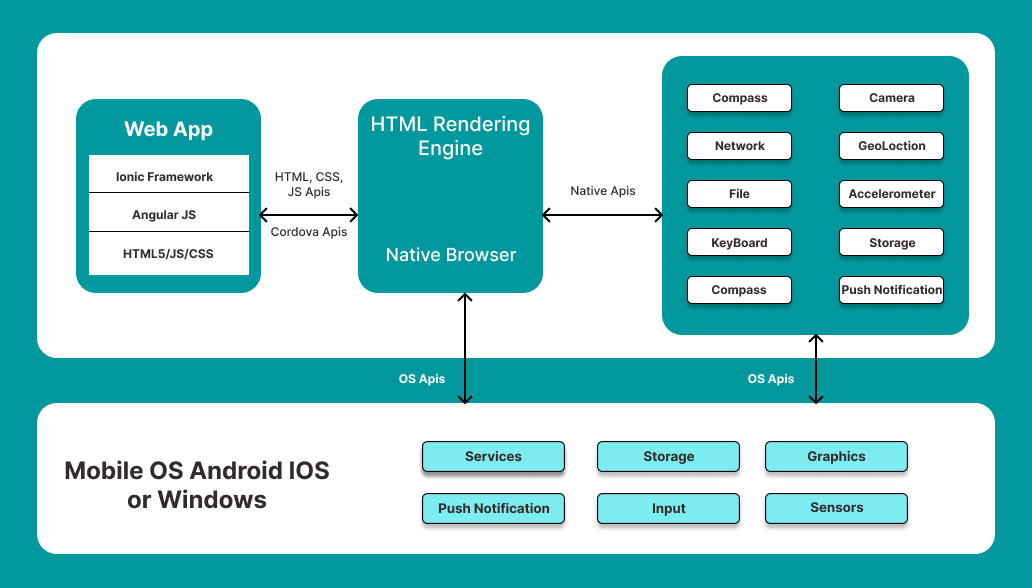
The framework supports the development of strong, feature-rich native apps. It enables ionic developers to use a variety of user interface (UI) elements in the application framework, such as filters, inputs, views, easy navigation, and actions sheets.
Features of Ionic
- Enhanced performance
- App development services for many other platforms.
- The user interface is always consistent.
- The flexibility of the consumer
6. Apache Cordova
Previously known as PhoneGap, Apache Cordova is a well-liked framework for creating applications for developers. It is a cross-platform application development framework that uses CSS3, HTML5, and JavaScript to create mobile apps.
Programmers can use hardware components on smartphones like GPS, cameras, and accelerometers to provide an interface that feels native thanks to the Cordova plugins. One code production approach and third-party application administration tools are two of Apache Cordova’s standout features.
Features of PhoneGap
- A single source of code
- Streamlining the development procedure
- App management methods from third parties
7. jQuery Mobile
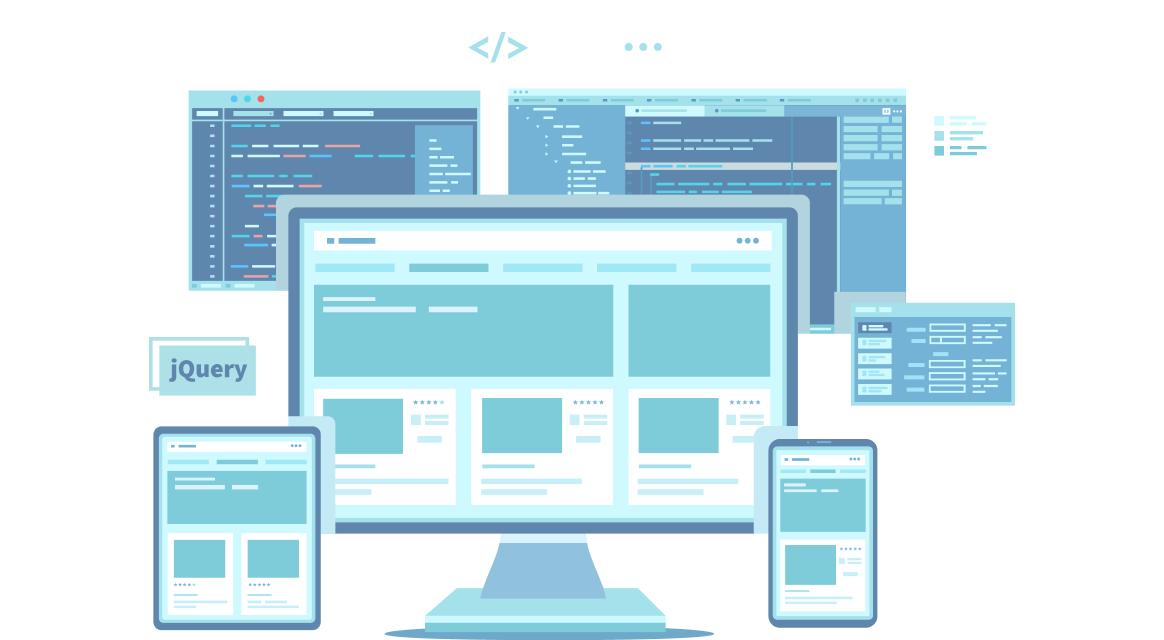
A precise framework for creating cross-platform mobile applications, jQuery Mobile enables the creation of applications that are explicitly platform-independent. This particular framework is used to create adaptable web portals that can function on several platforms, including PCs, tablets, and smartphones.
Programmers of Hybrid mobile application development can use hardware components on smartphones like GPS, cameras, and accelerometers to provide an interface that feels native, thanks to the Cordova plugins. One code production approach and third-party application administration tools are two of Apache Cordova’s standout features.
Features of jQuery
- It works well with all mobile app development frameworks.
- The size is limited
- PI compatibility is both straightforward and comprehensive.
8. Native Scripts
Native mobile applications rely on tools like Angular, Typescript, JavaScript, CSS, and Vue.js using the precise open-source Native Script framework. It was created and developed by progress. It is used to install NativeScript and all necessary plugins. Task creation, configuration, and collection are done via the command line or a GUI tool called NativeScript Sidekick.
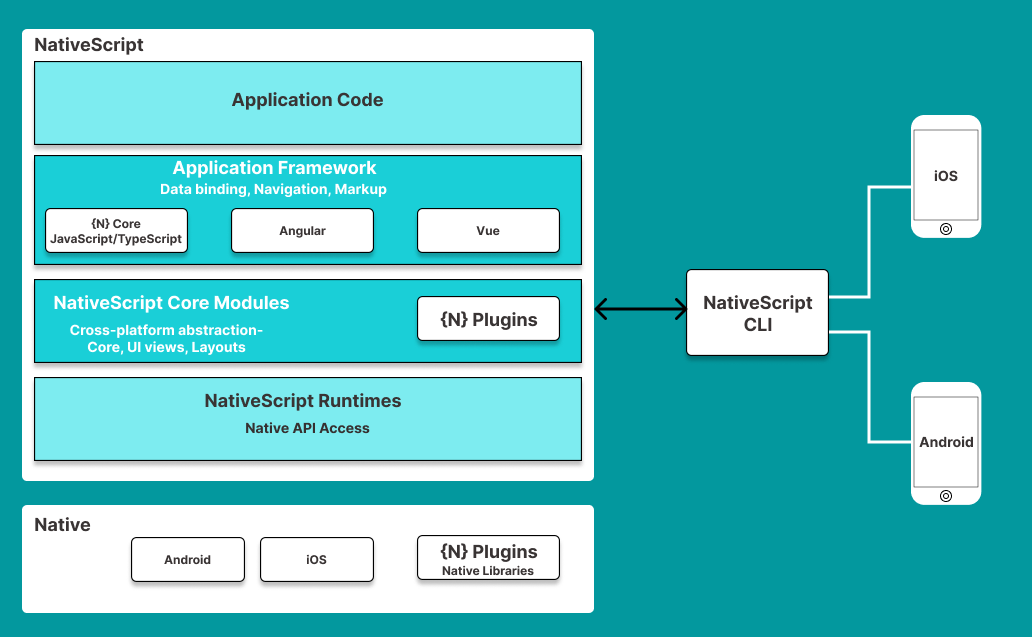
Developer use XML files to define platform-independent user interfaces. The native UI components of each platform are then called by NativeScript after operating the inferences represented in the XML files.
Using Angular and TypeScript, it is also possible to create application logic that is not dependent on the target platform. The framework for building native mobile applications is made using the node.js runtime and tooling. Native script is a better framework for reducing the amount of code and load time for the app on the system.
Features of jQuery
- Native user interface without Web Views
- Cross-platform application
- Direct and full access to iOS and Android APIs
- Robust backend support
- Mission-critical business
9. Sencha Ext JS
Sencha Ext JS is a cross-platform framework for mobile development. The result of combining Sencha and Ext JS is Sencha Ext JS, formerly known as Sencha. Jack Slocum developed it as a YUI add-on library attachment. It is possible to create data-intensive web and mobile applications using this JavaScript framework.
More than 115 high-performing, ready-to-use UI components are included with Ext JS. Just a few of the components include the HTML5 calendar, pivot grid, grids, trees, D3 adapter, toolbars, windows, and panels. Additionally, Sencha offers a huge variety of user extensions. Sencha offers a few styling themes for the elements as well.
A theme cannot be changed without changing its CSS and script. When using Sencha CMD, the application may need to be rebuilt. Ext JS is available in two flavors, modern toolkit, and classic toolkit. Along with the themes that are available, they differ from one another in terms of API.
Features of Sencha Ext JS
- One can manage millions of data
- Adjustable layout system
- Robust data analytics
- Graphical data presentation
- Advanced data-steered documents package
10. Onsen UI
Onsen UI is thought to be the most practical tool for developing sophisticated mobile applications. It is one of the most widely used technologies for developing mobile applications.

With JavaScript, HTML, and CSS, the technologies used to develop mobile apps produce stunning HTML apps. Additionally, it supports frameworks like Angular JS1, Angular 2+, Reacts, and Vue. Depending on the platform, this platform has competency in app formation.
Its user interface components include tabs, stack navigation, lists, forms, and more. Because Onsen UI version 2 has evolved to be JavaScript framework-agnostic, developers can now create mobile apps with or without any JavaScript framework.
An open-source framework called Onsen UI makes it simple to create hybrid apps and Progressive Web Apps (PWAs) that feel native. You can use the essential archive with any framework and its related tools because it is context-skeptical and entirely written in JavaScript. Thanks to the mechanisms’ optional platform-based auto-styling, it is possible to support both iOS and Android with just one source file.
Features of Onsen UI
- Zero time to set up
- Cost-efficient and time-effective development
- Straightforward to learn and use
- Explicit grid layout
- Platform, gesture, and rotation detection
11. Framework 7:
Framework7 is a versatile development launched in 2020 for Linux. However, developers use Framework7 to create highly interactive desktop, web, and mobile apps. This hybrid framework facilitates seamless access to various HTML, CSS, and JavaScript tools, while also providing the added advantage of Vue.js and React components to deliver a consistent flow.
The framework follows the same structure and aesthetics of Native iOS apps, delivering an engaging user experience. Moreover, Framework7 can also be used as a prototyping tool. With its open-source nature and a rich ecosystem, Framework7 is used to create stunning and responsive applications.
Features of Framework7:
- It leverages HTML/CSS for structure and JavaScript for functionality
- Component-based architecture
- Built-in UI widgets and themes
- Ease of customization
12. Symfony:
Launched in 2005, Symfony is an incredibly powerful PHP web application framework that is not only perfect for web development, but for creating ultra-rich mobile apps. By utilizing a combination of Symfony components and additional tools, developers can easily adapt Symfony for iOS-supported applications.
With its adherence to the Model-View-Controller (MVC) architectural pattern, Symfony offers a structured and modular approach to building applications. One of the standout features of Symfony is its collection of decoupled and reusable components. Developers can leverage Symfony’s powerful components, such as the Serializer and Routing components, to build expandable APIs that cater to the needs of a business.
Features of Symfony:
- HTTPFoundation
- URL routing
- Protection against web vulnerabilities
- Twig templating engine
13. Kendo UI:
Kendo UI is a hybrid HTML5 user interface framework, powered by Telerik that is generally used to create large-scale, cross-platform applications. The dynamic framework utilizes jQuery and has over 70 ready-to-use widgets and JavaScript UI libraries.
Kendo UI can be easily integrated with AngularJS and Bootstrap UI frameworks. It is easy to learn (since most developers are familiar with jQuery), and is becoming increasingly popular due to its open-source nature and free-of-cost usage.
Features of Kendo UI:
- 110+ UI components
- AppBar content arrangement tools
- MVVM Toolkit/libraries
- Wrappers for JSP/PHP technologies
14.Spring:
Built on the MVC architectural pattern, Spring is an open-source, comprehensive Java framework developed by Pivotal Software. Spring’s core features are compatible with any Java application. Additionally, there are specific extensions available for developing web applications using the Java EE (Enterprise Edition) platform.
Note that while Spring is not specifically designed for mobile development, it plays a vital role in the backend and server-side aspects of dynamic applications. UI developers prefer Spring when creating and managing the server-side logic, APIs, and databases that drive their app functionality.
Features of Spring:
- Built-in unit-testing capabilities
- Seamless integration with databases and platforms
- Supports loose coupling
- Suited to enterprise-level mobile app development
- Integrated cross-cutting support
15. Titanium:
Developed in June 2010 by Appcelerator Inc., Titanium is another open-source development framework that utilizes a Java-based SDK to create mobile applications for all platforms. Appcelerator Titanium is popular amongst developers for its vast collection of 5000+ APIs (compatible for Windows, Android, and iOS devices).
This enables developers to repurpose 80-90% of the JavaScript code, thus significantly reducing development times. Additionally, Titanium offers a plethora of UI components that can be utilized to deliver an immersive and delightful user experience.
Features of Appcelerator Titanium:
- API management and integration capabilities
- Shorter development lifecycle
- Hyperloop for code flexibility
- Cross-platform integration
Confused by 15 Different Frameworks? Let’s Find the One That Fits Your Business.
Choosing between React Native, Flutter, or Native isn’t just a tech choice—it’s a business decision. Get a free consultation to map out your app’s architecture and performance strategy.
Mobile App Development Challenges: Crucial Things You Must Know

Technical Challenges in Mobile App Development
The development of mobile apps is usually prone to different technical challenges that may undermine the functionality of your app.
Customers are also ruthless. Research indicates that up to 62% of users abandon an application once they have technical problems with it, like mobile crashes or other bugs.
The key technical mobile app development issues are:
Device Fragmentation and Compatibility Issues
The acknowledgment of disparities in mobile applications can be referred to as device fragmentation in terms of specifications such as screen size, screen resolution, and memory, processors, and so on. This is one of the greatest issues of developing mobile apps, particularly in the Android market.
To begin with, mobile applications have to be able to respond to different layouts, such as small phones, large tablets, and foldables.
Additionally, processors, RAM, GPUs, etc. are also not the same in terms of compatibility. Accordingly, problems with functionality will emerge. As an example, a program that is well optimized on a high-end device may just fail on a lower-end device.
To handle the problem of device compatibility, it is possible to render UI elements using responsive design components with relative (percentage) units, rather than fixed units (e.g., pixels).
Operating System and Version Diversity
The existence of multiple operating systems on the market and continuous updates being forced onto these systems is another mobile development challenge.
Use such platforms as iOS and Android, e.g., they keep on releasing new versions that are consumed by many users through various devices.
All versions of operating systems might be different in terms of features, user interface, or API; therefore, one is bound to become incompatible. As an example, what works very well in one version may break down in another.
The answer: Native platforms should be replaced with cross-platform development frameworks, such as React Native, Flutter, or Xamarin. It is also recommended to concentrate on the fundamental capabilities of the app, which could be utilized in all the supported OS versions, and gradually enhance the app to suit newer versions.
To update on the OS version updates, you may utilize version control systems to track future alterations. Also, run your app on beta and then be ready to make a seamless transition when the new updates are done.
Performance Optimization and Speed Concerns
Apps are expected to be responsive, smooth, and efficient by the users. A poor user experience can be caused by such issues as slow load times, lagging screens, or app crashes, which can increase the rate of app abandonment.
Common causes of performance problems include inefficient code, giant file sizes, too many network requests, and too much data processing.
To optimize the performance of your app, you can:
You can optimize your app to run heavy tasks on the cloud rather than using the mobile phone. Implement caching mechanisms and make sure to properly sync data to efficiently deal with network requests. Profiling tools, such as Android Studio Profiler, Xcode Instruments, or Firebase Performance Monitoring, can be used to detect possible performance bottlenecks in your code and optimize them. There are also many challenges in the development of mobile apps, such as design and user experience (UX).
Design Mobile App Development Challenges
Creating Intuitive and User-Friendly Interfaces
Designing the perfect user interface can be a problem due to a number of reasons. It can be because of technical problems and fragmentation of devices, as we mentioned earlier.
Nonetheless, a user-friendly interface is something that should be considered at the very outset. That is to say that one should not hurry or neglect processes such as wireframing and prototyping.
With prototyping, you need to:
-
Add conspicuous navigation bars that enable the user to locate what he/she wants with ease.
-
Provide visual aids such as size, color, and contrast to direct the user’s attention and provide a visual hierarchy.
-
Make sure that the design is not overloaded with information or intricate interactions.
You also need to carry out comprehensive user research to determine the needs, preferences, and behaviors of your target audience. This enables you to make better design decisions.
Balancing Functionality
The other significant design and UX issue in the development of mobile applications is the need to strike the balance between functionality and aesthetics.
An extremely useful app will not help when nobody is interested in using it because it has a bad design. Nonetheless, a gorgeous application that fails to do what it is supposed to do is also frustrating.
But why is this usually a challenge?
The developers can often concentrate on getting the features to be quick, and therefore the design considerations may be overlooked. Designers also have the habit of being preoccupied with the appearance and feel of the app without having complete knowledge of the technical limitations.
Technical constraints. Some of the design features (such as transitions or animations) can be both expensive and technically difficult to implement.
Key considerations: it may be easy to add more features and design elements to your app, but you should focus on adding the things you absolutely need. This facilitates the attainment of balance.
Accessibility Compliance
Users with disabilities like sight or auditory should be supported by your mobile app. Lack of the need to secure this could imply that you are not offering these users access to information, services, or opportunities within your app.
Minimum standards of accessibility to applications are yet to be globally accepted. Therefore, developers of mobile apps usually point at the Web Content Accessibility Guidelines (WCAG):
As WCAG states, to be considered an accessible website (or mobile application), all the content on the website must be:
-
Understandable: users should be in a position to understand all the elements of the UI design of the app and the information on every page.
-
Dynamics: UI elements and navigation of the site should be user-friendly.
-
Explainable: the object of the page and the manner in which they are to handle it must be apparent to the users.
By making your app available, you can also access more users and eventually increase the rate of downloads and interaction with your app.
Mobile App Development Security Issues
Securing Data and Privacy of Users
Mobile apps can ask users to provide sensitive data, including personal information, payment information, or location data, to allow users to use them to perform certain actions. This confidential information may be intercepted in transit on insecure servers without adequate protection of data.
The first step in ensuring proper data protection is to ensure you only collect data necessary for using your app. Another challenge is mobile app security issues. Hackers are ever seeking ways to exploit loopholes in mobile applications and utilize the mobiles in malicious applications. These cyberattacks have been estimated to cost the global economy about 10.5 trillion yearly by the year 2025.
In that regard, to introduce powerful data protection structures, do the following:
-
Safeguard network information in transit by ensuring that all the communication with the server is carried out over HTTPS. HTTPS forms data encryption between transmissions to ensure that the data cannot be intercepted by hackers.
-
Make sure that the application is connected to the current TLS (Transport Layer Security). This will assist you to have secure network communications.
-
Encrypt data on the host machine with system-level encryption systems (e.g., Android Keystore or iOS Keychain).
-
You should also make your users of the apps aware of how to control their privacy and not risk their personal data.
Prevention of Security Breaches and Hacks
Security breaches remain a liability that should be proactively avoided by mobile app developers and even users. Some of the usual causes of security breaches and hacks are malicious malware, unauthorized access, and code vulnerabilities.
You should also actively consider your code with regard to security holes. Scan your source code with Static Application Security Testing (SAST) tools to detect vulnerabilities such as SQL injection, cross-site scripting (XSS), and buffer overflows.
Additionally, perform a manual inspection of your codebase to identify security breaches that automated tools may fail to identify.
Good security of your backend infrastructure is required. Secure APIs and effective access control systems should be used to ensure that the app is not hacked. Also, your application must be regularly updated to deal with emerging security risks.
Managing Data Protection Legislation
There are several laws on data protection to safeguard the user data. To ensure that you are not in trouble with the law, your apps should be aligned with these laws.
There are some well-known data protection laws, such as:
-
GDPR — General Data Protection Regulation
-
CCPA — California Consumer Privacy Act
-
HIPAA — Health Insurance Portability and Accountability Act
Each of the regulations comes with certain requirements that developers must comply with, particularly when they are required to work in areas where they have been enacted.
In most cases, such rules will mandate you to:
-
Grant the consent of the users to collect data.
-
Introduce effective security measures to prevent data leakages.
-
Give the users the right to their data.
-
Be open about the sharing of third-party data.
Non-compliance can result in huge penalties, litigation, and loss of reputation. As an example, DoorDash was forced to settle a case for $375,000 on an allegation of selling its data to customers.
Benefits of Custom Mobile Application Development Frameworks
Mobile apps are dominating the market thanks to enhanced branding, customization, and user interaction. Furthermore, because of the wide range of mobile app development frameworks and devices available, achieving the highest customer engagement may be challenging. Since it began, it has caused disruptions to everyone’s use of internet services.
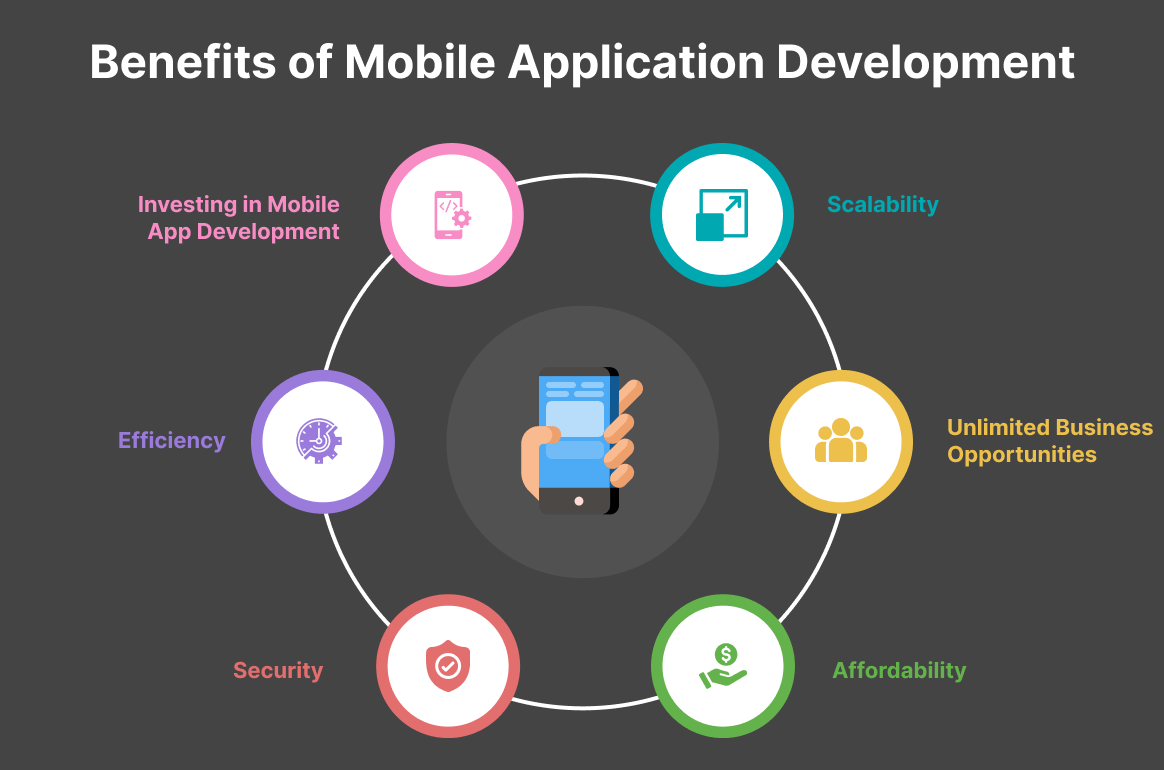
Particularly, eCommerce has flourished since adopting an app-centric strategy. The majority of mobile app traffic comes from devices that make up more than half of all internet traffic.
According to statistics, 79% of smartphone users made online purchases using their portable devices. Additionally, huge global mobile commerce sales of $2.3 trillion are projected for 2029. These conclusions may not have been reached by the new studies. And every single one of these estimates emphasizes the benefits of mobile apps over other digital channels.
1. Faster Operation
Faster than mobile websites are mobile applications. Even a responsive mobile website that is well-maintained and optimized cannot match an app’s speed. Today, businesses prioritize providing services as quickly as possible. Customer dissatisfaction results from even a slight delay that results in a significant loss.
The ability of apps to locally store data and instantly retrieve the pertinent dataset is one of their key functional advantages. Mobile websites, unlike apps, must retrieve data from servers that are far away, and this causes their performance to lag.
Furthermore, the complex coding frameworks used to create mobile apps are quicker to develop than the scripts used to create mobile websites to have an advantage over mobile websites, all of these features make up mobile apps.
2. Personalized Experience
A personalized shopping experience is more appealing to customers. Making a decision is made simpler when relevant goods and services are all around. Mobile apps encourage users to use more in this area. Every customer is excited to develop an emotional connection with the app because it provides real-time recommendations.
Mobile apps offer individualized experiences and content that is appropriate for the user. Applications that analyze user behavior, location, language, and interest can create a delightful experience for the users.
The mobile app also provides customization options so that users can set their preferences. This makes it easier for the eCommerce market to match the right products with the right customers.
3. Online and Offline Capacities
The ability to access mobile apps offline is one of their exciting benefits. Additionally, it is instantly accessible and has all of its features. By storing the necessary information on the device, it works reasonably well in both online and offline modes. And this is the primary characteristic that sets apart mobile applications. A seamless customer experience is also developed when the service is provided offline.
Use to access content without an internet connection, stay informed about the deals and keep track of their wish lists. This results in dependable and consistent user engagement and transforms it into a mobile business.
4. Utilization of Device Features
The features of native devices can be seamlessly incorporated into mobile apps. It creates a fantastic opportunity for constructive user interaction. For instance, to streamline the service, apps can request access to the camera, location service, payment gateways, etc.
Mobile apps can also make use of security features and notification capabilities to offer high-quality service. Mobile apps can thus offer customers an exceptional shopping experience by utilizing the various features of devices.
5. Instant Updates and Notification
This is among the most convincing justifications for eCommerce stores to create a mobile app. One effective way to turn users into customers is through push notifications. No matter what a user’s interest is, this feature helps to keep them informed about the deals.
The next incredible opportunity to engage customers is through in-app notifications. It continuously informs users of new offers and approaching sale seasons. Additionally, by examining user behavior, businesses can use this option to directly draw a user’s attention to their areas of interest.
6. Branding Possibilities
An app serves as a brand ambassador for the company. It has countless opportunities to involve customers in various ways. Apps can aid in enhancing brand recognition from the design aspect to the communication strategy. Your presence is maintained by giving your customers the services they need and engaging them frequently.
Additionally, mobile apps allow for direct delivery of the user’s preferred service. It facilitates and essentially speeds up mobile application development services. As a result, brands serve as a means of maintaining an emotional bond with consumers.
7. Affordability and Productivity
A great way to cut costs while ensuring productivity is through mobile apps. Apps can connect customers and vendors through a single direct channel, which lowers additional marketing costs. Additionally, they have direct access to one another via applications. Long-term, this leads to increased productivity.
Additionally, mobile apps make it possible to run a marketing campaign without the assistance of any third parties. Plus, by posting the offers on their walls, your customers can become your best social media marketer. This explains a significant decrease in your branding and marketing costs.
8. Enhanced User Interaction
Today’s consumers enjoy immersive experiences. Therefore, mobile apps are the best way to provide such a vibrant shopping experience from the comfort of their home. Mobile apps can take advantage of their unique user interface’s great potential to engage users in a variety of ways. Particularly, by enhancing the shopping experience with more interactive methods, stores can increase user trust.
9. Advanced Optimization Possibility
Compared to Google ranking criteria, the mobile application offers a more dynamic competitive advantage. You can rank both the app and website in search engine results by optimizing the in-app content and components for a better user experience. Additionally, using the right keywords and better SEO techniques to optimize your apps for app stores will increase the likelihood that users will find them.
Wrapping Up
A mobile app development framework is a process for developing software that includes, among other things, tools and software, compilers, debugging tools, and programming interfaces. As a result, a developer creates the framework and source code for the application, then uses a variety of components or frameworks for producing the application for various mobile devices. We at OrangeMantra assure you to meet all business requirements related to mobile app development projects.
FAQs
1. What is a mobile UI framework?
UI frameworks are essentially libraries that provide mobile app developers the tools they need to quickly create applications that offer a premium user experience. These libraries contain some JavaScript and CSS-based files that must be used in an HTML file.
2. Can .NET be used for mobile apps?
. NET is a platform for developers that includes tools, programming languages, and libraries for creating a wide range of applications. With tools and libraries designed specifically for creating apps for Android, iOS, tvOS, watchOS, macOS, and Windows, Xamarin expands the .NET platform.
3. What is UX in mobile apps?
The overall interaction a person has with any type of mobile device is referred to as the user experience (UX) in the mobile world (phone, tablet, wearable, hybrid). Apps, user interfaces, software, and the hardware itself all have interactions.
4. Why we use Mobile Framework for app development
We use mobile app development frameworks because of feasibility while developing app like improvement in speed ,bug free design and effectiveness in app