

A beginner-friendly guide that breaks down how AI models are trained—from defining the problem to deploying and monitoring real-world systems. Learn how top AI development teams structure datasets, clean data, choose the right model, train efficiently, evaluate performance, and prevent model drift. Perfect for anyone curious about how AI actually works behind the scenes.
Here’s what you will learn:
-
 How to define a clear, actionable AI problem before building anything
-
How to choose the right AI model type for your project (regression, classification, deep learning, etc.)
-
How to evaluate your AI model and avoid overfitting
-
How to deploy your model into real-world systems and monitor for model drift

ChatGPT didn’t just appear; it learned from a colossal library of text. The facial recognition on your phone didn’t magically know your face; it was trained on thousands of images.
If you’ve ever wondered how machines “learn” or felt intimidated by the technical jargon surrounding AI development solutions, you’re in the right place. This guide is designed for curious beginners and business professionals who want to understand the “how” without needing a PhD in computer science.
Here, we’ll walk through the seven essential steps that transform raw data into a functional AI model. We’ll bypass the dense academic theory and focus on the practical pipeline used by teams at top AI development companies, such as Google, OpenAI, and others.
Whether you’re looking to understand the technology shaping our world or take your first step toward building your own AI project, this guide provides a clear and actionable map of the journey.
Table of Contents
7 Steps of AI Model Training
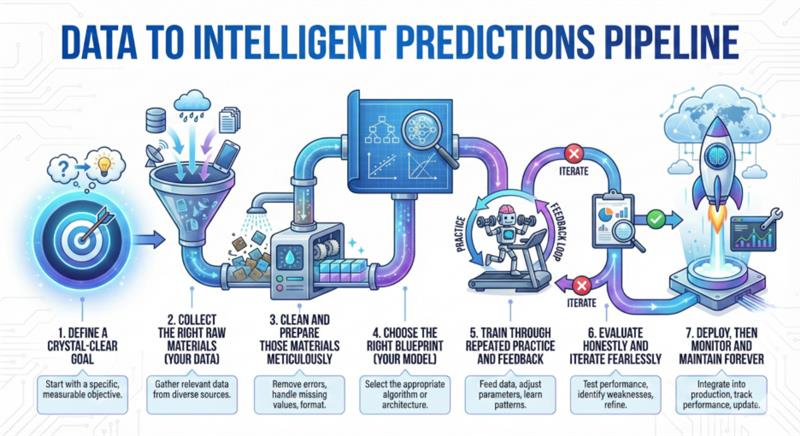
So, in this section, you will learn how to train AI models in 7 clear steps from data collection to deployment.
Step 1: What Do You Actually Want the AI to Do?
Before we collect a single piece of data or write a line of code, we need to start with the most human question of all: What problem are we actually trying to solve?
This might sound obvious, but it’s the step most beginners rush past, and it’s the number one reason Forbes said 85% of your AI Models may fail. You can’t teach something effectively if you don’t know what you’re teaching it to accomplish.
Step 2: The Treasure Hunt for Data
Okay, so you know what you want your AI to do. Now comes a reality check: Your AI can only be as good as the examples you give it. This is the single most important truth in machine learning development.
Think back to teaching your friend to recognize dog breeds. If you only show them blurry, dark pictures of dogs from 100 feet away, they’re going to be terrible dog spotters.
If you show them clear, well-labeled pictures from all angles, they’ll learn. The quality and relevance of the teaching material are everything.
In the world of training AI models, we have a not-so-polite phrase for this: “Garbage In, Garbage Out” (GIGO). Feed your AI messy, incorrect, or biased data, and you will get a messy, incorrect, or biased AI. It’s that simple.
Step 3: Data Cleaning
You’ve gathered your data. Now, before we start training our AI model, we have to do some preparation. This isn’t a glamorous part of the machine learning process, but it’s where most projects succeed or fail.
Cleaning is the foundational work of building a reliable AI. Here are the 4 essential tasks followed by our data cleaning experts.
a. Fixing Missing Values
Your dataset will have blanks. Maybe a customer didn’t enter their age, or a sensor failed to record a temperature.
What you can do in such a case is remove the entire row if too much data is missing. And the second thing is to fill in the blank with a smart guess, like the average value.
Most AI training algorithms freak out when they see “NaN” (Not a Number). They need complete data to learn patterns.
b. Removing Duplicates & Correcting Errors
The same customer entry might appear five times. Someone might have typed “USA” as “USA,” “U.S.A,” and “United States.” A price might be listed as “$10.99” in one place and “10.99” without the dollar sign in another.
In such situations, what you can do is standardize formats and deduplicate. This is often simple spreadsheet work that has a massive impact on your model’s accuracy.
c. Labeling Data
If your goal is to train an AI to classify images, you need to tell it what’s in the pictures. This process of adding the “answer key” is called data labeling.
But it can be tedious, expensive, and crucial. Services like Scale AI and Labelbox exist just for this. You can also use techniques like data augmentation (see below) to get more value from each label.
d. Data Augmentation
Don’t have enough labeled photos of cats? Take the ones you have and create new ones.
- How: Flip them, rotate them slightly, change the brightness, and add a little noise.
- Why: It teaches your AI that a cat is a cat, whether it’s facing left or right, in bright light or shadow. This makes your final model much more robust. It’s a cornerstone of modern deep learning development.
A Real Example of Tesla
Tesla’s self-driving AI doesn’t just need millions of miles of driving video. It needs that video to be labeled. Every pedestrian, stop sign, lane line, and car must be identified frame-by-frame.
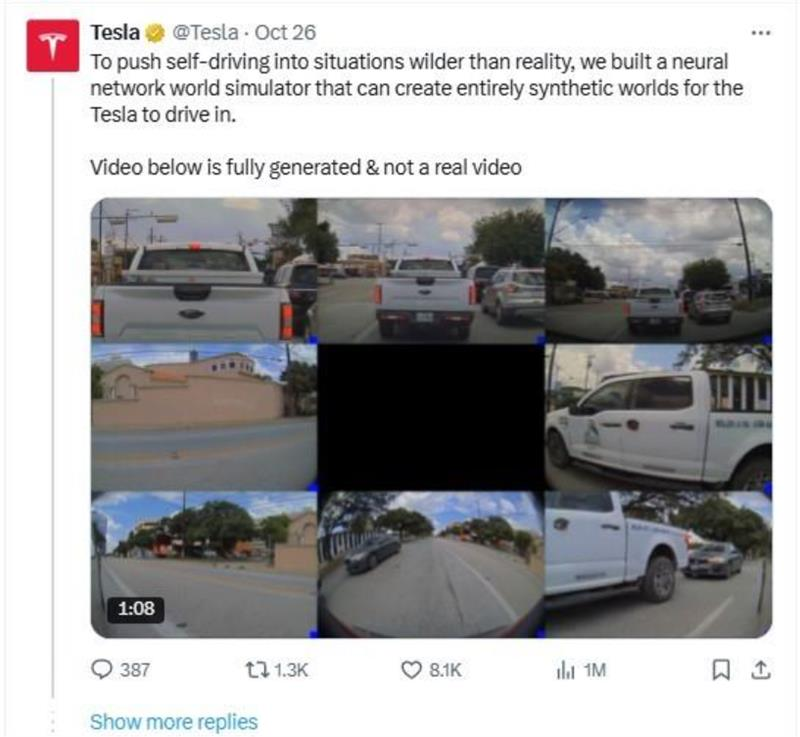
But they also use simulation (a form of augmentation) to create rare, dangerous scenarios the car must learn to handle without crashing in real life.
Step 4: Choosing the Right Model
Your data is clean, prepped, and ready. Now comes a fun part: choosing the actual AI model architecture, which is the mathematical framework that will learn from your data.
This step of model selection is a pivotal decision in your machine learning pipeline. Let’s make it simple.
Here’s your cheat sheet. Match your goal from Step 1 to the type of model that typically works best.
| What Are You Trying to Do? | Best Model Type | Real-World Example |
|---|---|---|
| Predict a number (price, temperature, sales) | Regression | Predicting next quarter’s revenue based on market trends. |
| Choose a category (spam/not spam, dog/cat/bird) | Classification | Sorting support tickets into “Urgent” or “General.” |
| Find hidden groups (customer segments, topics) | Clustering | Grouping website visitors by behavior without pre-defined labels. |
| Work with images, sound, or language | Deep Learning / Neural Networks | Facial recognition, voice assistants, and AI chatbot solutions like ChatGPT. |
Note that you don’t always have to build the brain from scratch. Often, you can fine-tune an existing one. A pre-trained model is an AI that has already been trained on a massive, general dataset. It already knows how to “see” basic shapes or “understand” grammar.
Hugging Face is the go-to hub for open-source AI models, especially for language and audio. TensorFlow Hub and PyTorch Hub are great for vision models.
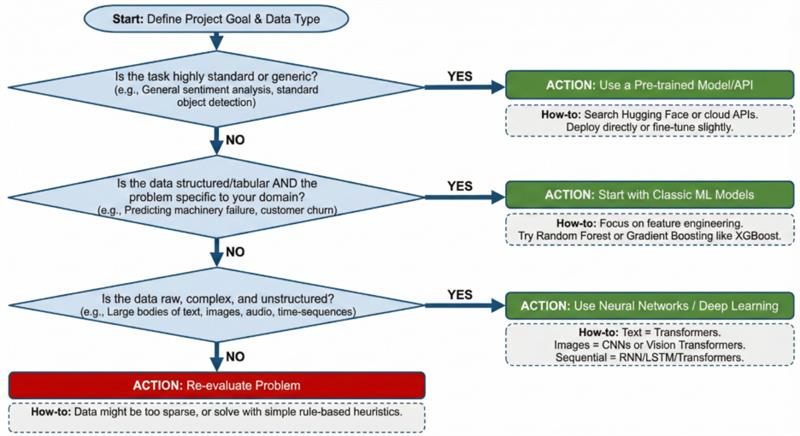
Image Showing a Practical Decision Flowchart for Your Project
Step 5: The Training Loop
This is the moment of your AI model development. The clean data meets the chosen model. Now, we make it learn. This is a repetitive, incremental process called the training loop. It’s the core engine of how machine learning works.
Let’s look at how the model gets smarter. Imagine we’re training a simple AI to spot cats in photos.
Make a Guess: The model sees a photo (input) and outputs its prediction: “78% cat, 22% dog.”
Check the Answer: We have the true label (it is a cat). The Loss Function (also called a cost function) calculates how wrong the guess was; like a penalty score. “You were off by 22%.”
Learn from the Mistake: The Optimizer takes that penalty score and uses a technique called backpropagation to tweak thousands of tiny internal knobs inside the model. The goal here is to make the penalty a tiny bit smaller next time.
Repeat: Do this for every image in the training set.
How long does it take to train an AI model?
AI development cost and the duration are questions every beginner asks. The honest answer: It depends entirely on three factors:
| Factor | Fast Training (Seconds-Minutes) | Slow Training (Hours-Months) |
| Model Size | Small model (e.g., spam classifier) | Large model (e.g., GPT-4) |
| Dataset Size | 1,000 clean examples | Millions of images or text documents |
| Hardware | Your laptop’s CPU | Hundreds of specialized GPUs |
- Train a simple email classifier on your laptop: 2-10 minutes
- Fine-tune a small image model on 10,000 photos: 1-4 hours on a good GPU
- Train a large language model from scratch: Months with millions in computing costs
Step 6: Evaluation & Iteration
The training loop has stopped. The graphs have flattened. Your AI model has “learned.” Now comes the critical, honest question: Is it any good?
This step separates academic experiments from practical tools. It’s where you put your AI model training through its paces, figure out where it fails, and go back to the drawing board.
Because the first version is almost never the final version. Remember that building any effective AI, be it an Agentic AI solution or other, is a cycle.
Step 7: Deploy & Monitor
You’ve done it. Your AI model is trained, tested, and ready. This is the moment where it transitions from a fascinating experiment on your computer to a functional tool that can deliver real value.
Deployment is the process of integrating it into an application, a website, or a service where it can start making predictions on live data.
But if you think this is the “happily ever after” moment, I need to share a crucial reality of production AI: Launch day is the starting gate for a whole new race.
Once deployed, your model faces a silent, inevitable challenge: the world changes, but your model’s knowledge is frozen in time.
This decay in performance is called model drift. It happens because the real-world data flowing into your model gradually becomes different from the historical data it was trained on.
Consider an AI model trained throughout 2019 to forecast consumer demand for a retail chain. It learned patterns based on steady economic growth. Then, March 2020 arrived. COVID-19 shattered the fundamental patterns of daily life.
Suddenly, the model’s “knowledge” was obsolete. Food items and home office equipment saw unprecedented demand, while travel and formal wear plummeted. This was model drift on a massive, abrupt scale.
5 Common AI Model Training Mistakes to Avoid
Want to skip months of frustration? Learn from the errors nearly every AI developer makes at least once. Avoiding these five common pitfalls will put you miles ahead in your machine learning model training.
-
Starting without a crystal-clear problem.
“Build something with AI” is a recipe for wasted time. Define exactly what success looks like before you write a single line of code.
-
Using dirty, unverified data.
Garbage in, garbage out isn’t just a saying; it’s a law. No amount of fancy algorithms can fix fundamentally flawed data.
-
Skipping the validation set.
Testing your model on the same data it learned from is like giving a student the exam answers and calling them a genius. It tells you nothing about real performance.
-
Deploying without a plan for model drift.
The world changes. If your model doesn’t adapt, its accuracy will silently decay until it becomes useless.
-
Expecting perfection on the first try
AI development is iterative. Your first model is a prototype, not a finished product. Embrace the cycle of build, measure, and learn.
Conclusion
If you take only one thing from this guide, let it be this: Training AI is a systematic process, not a magical event. You now understand the 7-step pipeline that turns raw data into intelligent predictions:
- Define a crystal-clear goal
- Collect the right raw materials (your data)
- Clean and prepare those materials meticulously
- Choose the right blueprint (your model)
- Train through repeated practice and feedback
- Evaluate honestly and iterate fearlessly
- Deploy, then monitor and maintain forever
You’ve seen that the real work happens in the data cleaning, the thoughtful iteration, the planning for drift. You know that a model trained once is a model destined to fail, and that the most important line of code you’ll write might be a simple alert that says, “Accuracy is dropping.”
So, what now?
Start small. Pick one tiny problem. Maybe sort your personal emails. Maybe predict tomorrow’s coffee shop sales based on the weather. Use the 7 steps. You’ll fail. You’ll clean bad data. You’ll overfit. And you’ll learn more from that first, messy, imperfect model than from any guide you read.
FAQs
Q1. How to train an AI model on your own data?
The process is identical to using public datasets, with one crucial difference: you’ll spend more time on data preparation. Here’s your checklist:
- Export your data (CSV, images, text files)
- Clean it thoroughly (handle missing values, fix formatting)
- Label it consistently (crucial for supervised learning)
Then follow the same 7-step pipeline given in this blog.
The advantage you get with your own data is that the AI Model outperforms generic ones because they learn your unique patterns and terminology.
Q2. How to create and train an AI model from scratch?
“From scratch” can mean two things:
- Building the architecture yourself (only for researchers/experts)
- Starting a project from zero (what most people mean)
For #2: Use the 7-step framework in this guide. Start with a clear problem, gather data, clean it, choose a pre-built model architecture (don’t build your own unless you must), train it, evaluate, and iterate. Most practitioners use established architectures and focus on tailoring them with their data.
Q3. How long does it take to train an AI model?
It ranges from minutes to months, depending on:
- Model complexity: Simple classifier (minutes) vs. LLM like GPT-5 (months)
- Dataset size: 1,000 examples (fast) vs. millions (slow)
- Hardware: Laptop CPU (slower) vs. GPU cluster (faster)
For your first project with your own data, expect:
- Data preparation: 1-3 days (80% of the work)
- Actual training time: 30 minutes to 4 hours
- Iteration cycles: Additional 1-2 hours per improvement round
Q4. What hardware do I really need? Can I use my laptop?
For most beginners: your laptop is fine. Start with smaller datasets and classic ML models (Random Forest, Logistic Regression). When you graduate to deep learning with images/text, you’ll want GPU access. Use Google Colab (free GPU) or services like Kaggle Notebooks before investing in expensive hardware.
Q5. Can I use Excel/Google Sheets data to train an AI?
Yes! Structured data from spreadsheets is excellent for many machine learning models (like predicting sales or classifying leads). Export as CSV, clean it in Python or a tool like Pandas, and you’re ready. This is one of the most common ways businesses start with AI.
Q6. Why does my model work perfectly during training but fail in the real world?
This is almost certainly overfitting. Your model memorized the training data but didn’t learn general patterns. Solutions: 1) Use a proper train/validation/test split, 2) Get more varied training data, 3) Simplify your model, 4) Apply regularization techniques.
About the Author


Related Articles