Choosing between Kotlin Multiplatform and Flutter is a pivotal decision for any app development project in 2025.
Both promise to build iOS, Android, and web apps from a shared codebase, but they take fundamentally different approaches.
This isn’t about finding a “best” framework, but the right one for your specific needs.
In this Kotlin Multiplatform vs Flutter guide, we will be cutting through the hype to compare their architecture, performance, tools, and more, giving you the clarity to make a strategic investment.
Table of Contents
What is Cross-Platform & Multiplatform Development?
In today’s digital landscape, businesses need to reach users on multiple platforms – iOS, Android, web, and desktop.
This is where cross-platform and multiplatform development come in, offering smarter ways to build software without maintaining separate codebases for each platform.
Cross-Platform Development (exemplified by Flutter) involves creating one codebase that runs across all platforms with a consistent interface and behavior. It’s like building with universal building blocks that work everywhere.
Multiplatform Development (led by Kotlin Multiplatform) focuses on sharing business logic and data layers while allowing platform-specific user interfaces. Think of it as sharing the brain while letting each platform have its own personality.
Kotlin & Flutter Explained
The Kotlin language, which is natively supported on Android, was created by JetBrains, the company behind Kotlin Multiplatform (KMM). Furthermore, KMM enables native UI code for iOS and Android while enabling developers to reuse business logic across platforms. Applications that rely heavily on Android and want to extend to iOS may benefit from this strategy’s more Android-centric performance.
The Dart language is used by Google’s Flutter, which offers a single framework for creating desktop, web, iOS, and Android applications. Moreover, it enables programmers to create aesthetically pleasing user interfaces that work on all devices. Furthermore, Flutter has gained popularity among businesses looking to launch applications rapidly because of its capabilities for sophisticated animations and widgets, as well as its expanding developer pool of over 500,000 developers.
Kotlin Multiplatform and Flutter: In Depth Comparison
The choice between these frameworks extends far beyond technical specifications, influencing team dynamics, development velocity, and product evolution.
The following comprehensive comparison table examines the critical factors that distinguish these approaches in real-world scenarios.
Kotlin Multiplatform vs. Flutter: A Quick Overview Comparison Table
| Aspect | Kotlin Multiplatform | Flutter |
| Stars On Github | 51.5k stars | 173k stars |
| Maintained By | JetBrains | |
| Approx Developer price per hour | $15-$150+ | $15-$150 |
| Use Rate According To 2023 Statistica Study | 4% | 46% |
| Language Ownership | Fully Open Source | Fully Open Source |
| Stackoverflow Newest Questions Number | 97,912 | 2,01,222 |
| Tooling & IDE | Gradle‑based builds with Android Studio/IntelliJ; integrates cleanly with Xcode projects for iOS targets | Unified CLI, hot reload, DevTools, VS Code and Android Studio support; streamlined multi‑target workflow |
| Verified Production Use | Netflix, Philips, McDonald, BiliBili, VMWARE, 9GAG, Uber, Physics Wallah , Meetup, CashApp | Google Pay, eBay, ByteDance, Google Earth, Fitbit Ace, PUBG Mobile, Headspace, LG Electronics, Dream11 |
| Best use cases | 🟢 Startups/MVPs, eCommerce, media/education, campaign apps needing identical UX and rapid iteration | 🟢 Enterprise, finance/healthcare, Android‑first products, and apps needing deep OS features or security |
| Community & Adoption | 🟡 Growing ecosystem with multiple repositories across Kotlin and Compose Multiplatform projects. Smaller but dedicated community, often used in enterprise environments for shared business logic. | 🟢 Large, established community with approximately 160k-180k stars on the main repository. Strong presence in cross-platform mobile development with extensive learning resources and community support. |
| Maintenance & Governance | 🟢 JetBrains stewardship with open-source Apache 2.0 licensing. Regular updates and strong corporate backing from JetBrains with contributions from various companies. | 🟢 Google leadership with BSD-style open-source licensing. Strong Google investment with consistent releases and extensive corporate support from the Flutter team and partners. |
| Developer Landscape | 🟡 Specialized community not specifically tracked in major developer surveys. Popular among Android developers expanding to multi-platform and companies needing shared business logic across platforms. | 🟢 Broad adoption with approximately 9% usage reported in Stack Overflow’s 2023 survey. Strong presence across startups, enterprises, and individual developers worldwide. |
| Production Usage | 🟢 Verified shared logic implementations in various enterprise applications. Used for business logic sharing while maintaining platform-specific UI layers in production environments. | 🟢 Proven production track record with verified implementations including Google Ads, Google Pay, eBay Motors, and Alibaba/Xianyu. Extensive public case studies and performance documentation. |
| Learning Curve | 🟢 Smooth for Java/Kotlin developers – Natural progression from Android/Java development with familiar tooling and concepts. Business logic sharing comes naturally to experienced JVM developers. | 🟡 New paradigm for Java developers – Requires learning Dart language and Flutter’s widget-based reactive framework. Steeper initial learning curve but comprehensive documentation available. |
| Code Sharing Strategy | 🟢 Flexible sharing approach – Enables incremental adoption from business logic sharing to full UI sharing via Compose Multiplatform. Supports sharing 1-100% of code based on project needs and team structure. | 🟢 High code reuse model – Designed for extensive code sharing across UI and business logic layers. Consistent architecture across platforms enables maximum code reuse with minimal platform-specific code. |
| Performance Profile | 🟢 Native performance characteristics – When using platform-native UI components, delivers true native performance. Shared logic compiles to native binaries ensuring optimal execution efficiency. | 🟢 High-performance rendering – Custom rendering engine (Impeller/Skia) provides consistent performance across platforms. Targets smooth 60fps rendering with direct GPU access and optimized pipeline. |
| Development Tools | 🟢 Mature build infrastructure – Gradle-based build system with seamless Xcode integration. Android Studio provides comprehensive support for shared modules and platform-specific projects. | 🟢 Optimized development workflow – Flutter CLI provides unified tooling across platforms. Hot reload, widget inspector, and DevTools suite enable rapid iteration and debugging. |
| Native Integration | 🟢 Direct platform access – Type-safe native API access through expect/actual declarations. No serialization overhead with direct calling between shared code and platform APIs. | 🟡 Bridge-based approach – Platform channels enable native communication with serialization/deserialization overhead. Pigeon and FFI provide improved type safety but maintain interop boundary. |
| Package Ecosystem | 🟡 Expanding package availability – Distributed across Maven Central and other repositories. Growing collection of KMP-specific libraries with increasing enterprise support and community contributions. | 🟢 Mature package ecosystem – Centralized at pub.dev with extensive, curated packages specifically designed for Flutter. Comprehensive coverage for UI components, state management, and platform integration. |
| Development Experience | 🟡 Logic-focused workflow – Emphasizes business logic sharing with platform UI specialization. Compose Multiplatform enables shared UI development with Live Edit functionality in Android Studio. | 🟢 Rapid UI development – Stateful hot reload enables instant UI updates without losing application state. Unified development experience across all target platforms with consistent tooling. |
| Rendering Architecture | 🟢 Flexible rendering options – Supports platform-native rendering or Skia-based rendering via Compose Multiplatform. Choose between native look-and-feel or consistent cross-platform UI. | 🟢 Unified rendering engine – Custom Impeller/Skia engine provides consistent pixel-perfect rendering across all platforms. Direct Metal/Vulkan/OpenGL access ensures high-performance graphics. |
| Platform Support | 🟢 Broad platform targeting – Shared logic across mobile, desktop, server, and web. Platform-specific UI implementation allows deep integration with each platform’s native capabilities. | 🟢 Comprehensive platform coverage – Full-stack development across mobile, web, desktop, and embedded. Consistent behavior and appearance across all supported platforms. |
| Project Setup | 🟡 Modular architecture – Requires configuration of shared modules alongside platform-specific projects. More complex initial setup but provides greater architectural flexibility. | 🟢 Unified project structure – Simple initialization with consistent project layout across all platforms. Lower configuration overhead with standardized development environment. |
| Documentation & Resources | 🟡 Improving documentation – Growing collection of guides and examples. More fragmented across multiple JetBrains resources but quality is consistently improving. | 🟢 Extensive learning materials – Comprehensive official documentation, video tutorials, and community resources. Well-structured learning path with abundant examples and best practices. |
When to Use Flutter or Kotlin Multiplatform
Your choice in the Kotlin Multiplatform vs. Flutter debate isn’t about which is better, but which is better for your specific situation. Here’s a clear breakdown of when to use each.
When to Choose Flutter
Use Flutter when you need:
- Build an app built ASAP: It’s single codebase approach, and hot reload can get an MVP (Minimum Viable Product) to market in 1-3 months.
- Pixel-perfect smooth design everywhere: Great choice if you want the exact same UI and brand experience on iOS, Android, web, and desktop.
- A small, efficient team: One team can build and maintain the entire app, reducing costs and complexity.
Ideal for these projects:
- E-commerce apps that need a consistent, fast-updating storefront.
- Media and educational apps where a uniform content layout is key.
- Internal business tools where development speed trumps deep native customisation.
Top 5 Flutter’s Benefits for Businesses
Maximum Code Reuse & Rapid Development:
High code sharing across platforms with stateful hot reload enables instant UI updates and faster iteration cycles.
Quick Market Deployment:
Single codebase architecture streamlines development, getting products to market faster with consistent behavior across all platforms.
Low-Cost Maintenance:
Managing one codebase for iOS, Android, web, and desktop significantly reduces long-term development and upkeep costs.
Exceptional Customizable UI & Mature Ecosystem:
Rich widget library combined with extensive packages on pub.dev enables beautiful, branded applications.
Multi-Platform Reach & Strong Community:
Deploy everywhere from a single project while leveraging extensive resources and Mobile app development services for rapid innovation.
When to Choose Kotlin Multiplatform
Use Kotlin Multiplatform when you need:
- Top-tier security and compliance: Direct, type-safe access to native APIs (Keychain, Keystore) is crucial.
- To leverage existing native apps: You can share business logic incrementally without a full rewrite.
- True native performance: The UI is fully native, and shared logic compiles directly to platform binaries.
Ideal for these projects:
- Healthcare apps handling clinical data, EHR integrations, and secure messaging.
- Financial and government apps for transactions, cryptography, and other regulated processes.
- Enterprise systems extending mature Android codebases to iOS or unifying logic across mobile and backend.
Kotlin Multiplatform Benefits for Businesses
Platform Authenticity & Native Performance:
Uses true native UI components (SwiftUI, UIKit, Jetpack Compose) while delivering optimal performance through direct compilation to platform binaries.
Strategic Code Sharing & Adaptable Integration:
Perfect for expanding from existing Android codebase to iOS with reusable business logic and flexible sharing approach.
Enhanced Security & Deep Integration:
Direct, type-safe native API access through expect/actual declarations eliminates bridge vulnerabilities and overhead.
Lower Long-Term Maintenance & Expanding JetBrains Support:
Independent UI development reduces future maintenance complexity, backed by strong corporate support and regular updates.
Enterprise-Ready Architecture:
Gradual adoption model fits complex organizations and preserves prior investments while enabling shared logic across mobile, desktop, and server.
A Comprehensive Comparison: Flutter vs. Kotlin Multiplatform
Forget the bullet points on a sales page. Picking a technology is about how it changes your team’s workflow. Let’s break down the real-world impact of Flutter and KMP.
1. Building Fast & Keeping Your Sanity
Kotlin Multiplatform (KMP): Think of this as your “diplomatic” option. If your team is already fluent in Android development, KMP fits right in. It lets you quietly share the core logic of your app, which is a lifesaver when you need to spin up an iOS version of an existing Android product. The trade-off? You’re still signing up for two separate front-end builds. Every new screen or feature means your design and QA folks are essentially doing the job twice.
Flutter: The single codebase is a clear winner for rapid market launch and long-term feature updates across all platforms. A single change propagates to iOS, Android, web, and desktop simultaneously, drastically reducing maintenance overhead and ensuring feature parity.
2. Total Cost of Ownership (TCO)
Kotlin Multiplatform (KMP): With KMP, the initial price tag looks great. You’re not spending a fortune on retraining; your existing team can just pivot. But that’s the upfront cost. The real expense hides in the duplication. You’re still paying to build and upkeep two separate front-ends. It’s like owning two houses that need separate plumbing and repairs—the bills never really stop.
Flutter: Flutter often makes more financial sense for a new project or a smaller team. Why? Because one codebase is just cheaper to manage. You’re developing, testing, and debugging one thing, not two or three. And its package repository, pub.dev, is a game-changer. It’s like a massive, well-sorted hardware store where you can find a pre-built solution for almost any problem, which saves you from writing messy code yourself and racking up more development hours.
3. Hiring & Learning Curve
Kotlin Multiplatform: A natural fit for Java/Kotlin/Android developers. The learning curve is shallow for sharing business logic, making it ideal for organizations that want to adopt cross-platform development without retraining their entire team.
Flutter: Requires learning Dart and a new, widget-based reactive paradigm. While this presents a steeper initial climb for native developers, the payoff is significant. Post-ramp-up, the unified tooling and hot reload lead to high productivity for a single, versatile team.
The Look and Feel: Blending In or Standing Out
This is a classic dilemma: do you want your app to feel like it was born on an iPhone, or do you want it to have its own unique brand everywhere?
KMP lets you have it both ways, with a catch. You can use Apple and Google’s own UI toolkits to make your app feel 100% native on each platform—this is crucial for apps where user trust is built on familiarity, like in banking. Or, to save time, you can use Compose Multiplatform to share the UI, but it might feel a tiny bit generic on each OS.
Flutter does its own thing. It paints every pixel itself, which is a massive win for consistency. Your brand will look and work exactly the same on every device, which is perfect for media apps or e-commerce stores with heavy branding. The downside? Your app won’t automatically get the latest iOS or Android visual refresh; your team has to manually implement those new trends.
Speed and The Toolbox
KMP is a performance powerhouse. Because it compiles directly to native code, it’s incredibly fast, especially when using the native UI. Its ecosystem, backed by JetBrains, is growing fast but can feel a bit like a wild west. You might need to dig through a few libraries to find the right, stable one for the job.
Flutter is “fast enough” for nearly every app, delivering buttery 60fps animations. Its real advantage is the toolbox. The pub.dev ecosystem is massive and mature. Need a chart, a login button, or a video player? There’s almost certainly a high-quality, ready-to-use package that will save you weeks of work.
Testing and Building: One Pipeline or Two?
KMP fits into your existing native workflows. You can test the shared logic in one place, but the UI needs to be tested separately on iOS and Android. This means more setup and coordination, juggling both Gradle and Xcode, but the tests are very true-to-life.
Flutter simplifies everything. One codebase means one set of tests and one streamlined build process. The “hot reload” feature is a game-changer—you see your changes instantly, which makes building and fixing things incredibly fast.
The Long-Term Bet
KMP feels like a safe, corporate investment. Backed by JetBrains, it has a stable, predictable future. It’s a low-risk choice for big companies already using Java/Kotlin, as it doesn’t lock you into a single vendor and lets you ride the coattails of Apple and Google’s own platform updates.
Flutter is backed by Google and has a frenetic, energetic pace. Its future is secure thanks to a huge community, but it moves fast. Your team needs to be okay with constant evolution, adapting to new best practices and occasional big changes under the hood.
4. UI Strategy: Native Fidelity vs. Cross-Platform Consistency
KMP gives you a strategic choice. You can use native UI tools (SwiftUI/Jetpack Compose) for an app that feels 100% at home on each platform—a must for apps in finance or healthcare. Or, you can share the UI with Compose Multiplatform for more efficiency, accepting a slightly less platform-specific feel.
Flutter paints its own UI everywhere, which gives you perfect visual consistency across all devices. This is ideal for building a strong, recognizable brand or for animation-rich apps. The trade-off is that your app won’t automatically adopt the latest iOS or Android design trends; your team has to implement them.
5. Performance & Ecosystem Maturity
Kotlin Multiplatform: Delivers true native performance, especially when using platform UI, as it compiles directly to native binaries. The ecosystem is growing rapidly under JetBrains’ stewardship but remains more fragmented than Flutter’s, requiring more research to find production-ready libraries.
Flutter: Provides excellent performance for most modern apps, with a consistent 60fps target. Its custom Impeller rendering engine ensures smooth animations. Flutter’s greatest strength here is its mature, centralized ecosystem on pub.dev, which offers a vast library of pre-built, well-documented packages for almost any need, dramatically accelerating development.
6. Testing, CI/CD, & Tooling
Kotlin Multiplatform: Aligns with native workflows. Shared logic can be tested centrally, but platform UIs require separate, platform-specific testing. This provides higher fidelity but adds complexity in orchestrating tests and builds across Gradle and Xcode.
Flutter: Offers a superior, unified experience. A single codebase means a single test suite and a simpler CI/CD pipeline. The integrated DevTools and stateful hot reload create a fast, efficient feedback loop for developers.
7. Strategic Governance & Future Outlook
Kotlin Multiplatform: Backed by JetBrains, offering a stable, predictable roadmap. It’s a low-risk choice for enterprises, especially those heavily invested in the JVM ecosystem, as it avoids vendor lock-in and leverages native platform roadmaps.
Flutter: Backed by Google, with a massive community and rapid innovation cycle. While this means constant improvement and a very secure future, teams must be prepared to adapt to evolving best practices and rendering engine updates (e.g., the shift to Impeller).
Feature/Code Sharing Comparison: Flutter vs Kotlin Multiplatform
| Aspect | Flutter (Max Code Possible Sharing) | Kotlin Multiplatform (Limited to Medium Sharing) |
| UI & Layout | Complete UI code shared via Flutter widgets with platform-adaptive components | UI can be shared via Compose Multiplatform or kept platform-specific for native fidelity |
| Business Logic | 100% shared | 100% shared |
| Navigation | Fully shared using Navigator/Router with deep link and web sync support | Can be shared using Compose Navigation libraries or implemented per-platform |
| Animations & Styling | Consistent animations and theming across platforms with adaptive behavior | Animations and styling can be shared via Compose or customized per-platform |
| Database Operations | Fully shared with platform-specific implementations via plugins | Fully shared with native database access on each platform |
| Platform-Specific Code | ~5-10% (native bridges and platform-specific adaptations) | ~15-40% (varies based on UI sharing strategy and native integrations) |
| Team Structure | Single unified team | Platform specialists + shared logic team |
| Use Cases | Startups/MVPs, eCommerce, media/education, campaign apps needing identical UX and rapid iteration | Enterprise, finance/healthcare, Android‑first products, and apps needing deep OS features or security |
| Best For | Maximum consistency and single UI paradigm across all platforms | Native tooling with optional shared UI, ideal for Kotlin-first teams needing platform API access |
Key Takeaway:
- Flutter provides maximum code sharing with a consistent UI framework
- Kotlin Multiplatform offers strategic flexibility – share only logic or include UI via Compose Multiplatform
- Platform-specific code varies based on project requirements and sharing strategy
- Team structure can be adapted to organizational needs with both approaches
Choose Flutter when you want a unified development experience and consistent UI everywhere.
Choose Kotlin Multiplatform when you need native tooling integration with flexible sharing options.
Things to Think About: Choosing the Best Option for Your Company, Kotlin Multiplatform vs Flutter
Consider these crucial elements while assessing development frameworks:
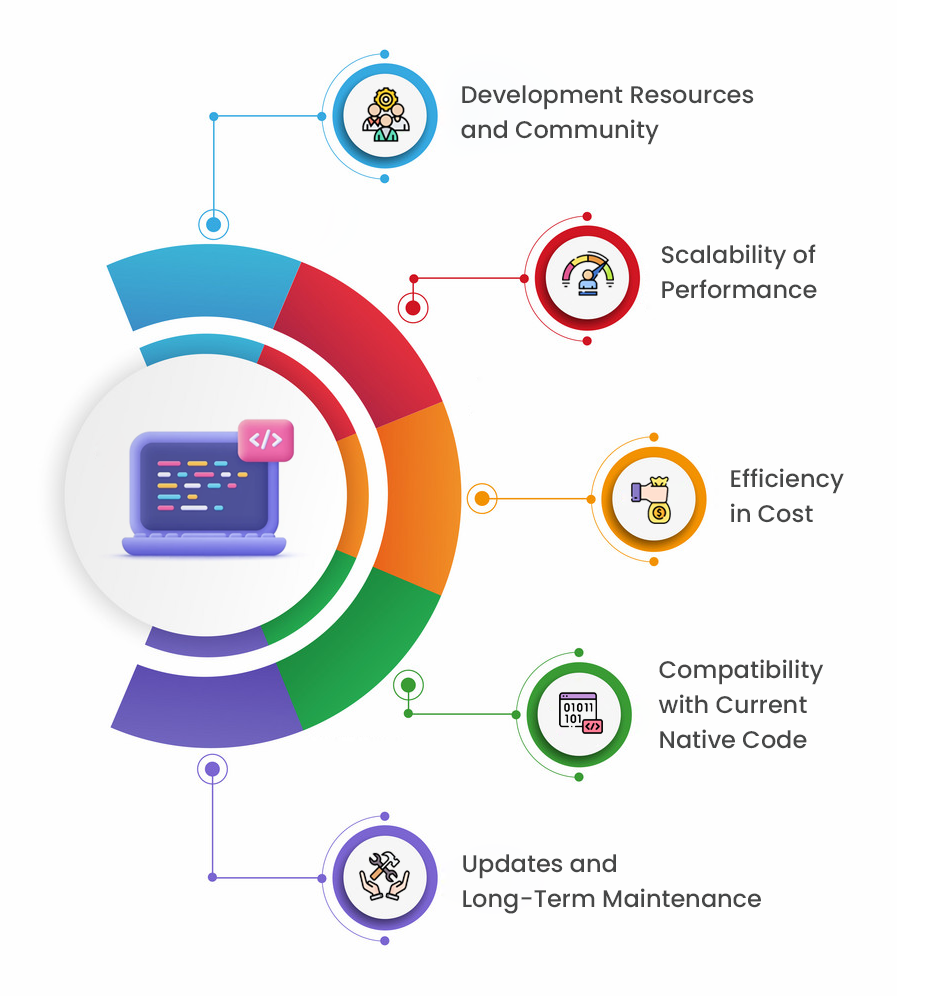
1. Efficiency in Cost
Although Kotlin Multiplatform enables developers to reuse code across platforms, the user interface (UI) has to be natively written for iOS and Android, which might raise startup costs. Nonetheless, it often lowers maintenance costs, particularly for apps designed for Android. In contrast, Flutter uses a single codebase for both iOS and Android, which may save up to 30% on development expenses.
2. Scalability of Performance
Kotlin Multiplatform provides almost native speed on Android for apps that use a lot of data. Furthermore, smoother, higher-performance experiences may result from its capacity to share just business logic while maintaining native user interfaces. Flutter’s methodology, on the other hand, works well for small-to-medium business solutions and visually appealing apps where performance scaling is not the main issue.
3. Development Resources and Community
The distinct communities and support systems of Flutter and Kotlin Multiplatform might affect troubleshooting and development pace. Because of Google’s enormous support and resources, which provide access to a great array of plugins, tutorials, and third-party integrations, Flutter has a large and vibrant community.
Despite being more recent, JetBrains supports Kotlin Multiplatform and it enjoys a constant increase in resources and support as Android developers use it more and more. Furthermore, as more companies prefer Android-first functionality, Kotlin is catching up, but Flutter presently has a bigger developer community by 30%, which might imply quicker access to solutions, according to recent industry statistics.
4. Compatibility with Current Native Code
Integration with native iOS or Android components might be crucial when working with an existing codebase. Moreover, businesses with native Android applications benefit from Kotlin Multiplatform’s ability to integrate easily with pre-existing Android projects and libraries, which makes Android extensions and upgrades easier.
For projects containing major native integrations, Flutter may hold down the process a little since it frequently takes more initial setup and changes for flawless interaction with native modules, especially on iOS.
5. Updates and Long-Term Maintenance
Adaptability to changing mobile operating systems and long-term maintenance are important factors. Furthermore, businesses who prioritize Android compatibility may find Kotlin Multiplatform structure useful since it offers a high degree of flexibility with Android releases. Kotlin Multiplatform vs Flutter’s single codebase approach helps expedite cross-platform requirements that favor concurrent iOS and Android upgrades while also lowering expenses over time.
According to recent industry surveys, Flutter users enjoy 20-25% cheaper maintenance costs as a result of this single codebase strategy. Moreover, Android app development is an important consideration for companies who want to maintain efficient maintenance operations.
2025 Trends: Perspectives on Developing Across Platforms
Furthermore, it was anticipated that by 2024, cross-platform solutions will account for 45% of mobile app initiatives. In the Kotlin Multiplatform vs Flutter conversation, Flutter is still a preferred option for industries like education and retail due to its single-codebase methodology, which streamlines updates and expedites development. 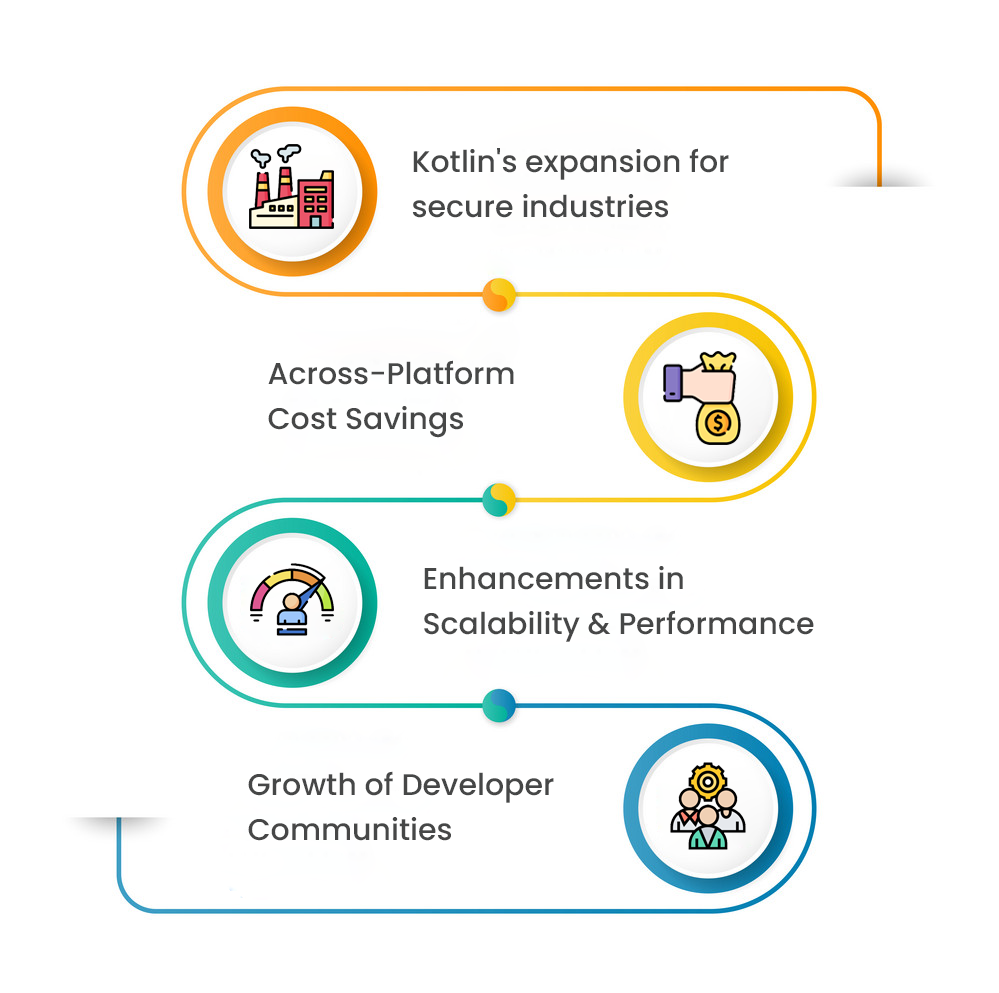
1. Kotlin’s expansion for secure industries
Kotlin Multiplatform is becoming more and more popular for finance and enterprise applications where near-native performance and data security are critical. Kotlin Multiplatform is expected to be used by financial institutions due to its safe backend integrations and effective Android compatibility.
2. Across-Platform Cost Savings
When compared to separate native builds, businesses that use Flutter often claim 30% savings in development expenses. Furthermore, trends suggest that more businesses will favor cross-platform solutions in 2024 for cost-effectiveness. Thus, in the Flutter vs Kotlin cross-platform race, Flutter often stands out for cost savings.
3. Enhancements in Scalability and Performance
Better speed and scalability are being driven by improved frameworks in Kotlin Multiplatform Vs Flutter. While Kotlin’s architecture provides great performance on Android, which benefits big corporations, Flutter’s upgrades aim to provide seamless experiences for small-to-medium commercial applications.
The choice between these frameworks extends far beyond technical specifications, influencing team dynamics, development velocity, and product evolution. The following comprehensive comparison examines the critical factors that distinguish these approaches in real-world scenarios.
4. Growth of Developer Communities
The developer bases of both platforms have seen notable growth: Kotlin’s developer base has increased by 20% and Flutter’s by 25% in the last year. Moreover, the Kotlin Multiplatform vs Flutter trend increases the availability of resources and support choices for companies using both platforms.
Top OrangeMantra Case Study for the Development of Flutter and Kotlin Multiplatform
Kotlin Multiplatform
Kotlin app development company was chosen by a finance business to develop a safe and very responsive Android app that is also compatible with iOS. Because of the smooth Android experience, this decision resulted in a 20% boost in user retention.
Flutter-Powered eCommerce App
Flutter was selected by an eCommerce company because of its cross-platform compatibility and configurable user interface. Within six months, the app’s user engagement increased by 25% as a result of the consistent, eye-catching platform experience.
Other Real-World Use Cases by Industry
Seeing how industry leaders leverage a technology is the best way to gauge its potential. Below, we explore real-world successes with both Kotlin Multiplatform and Flutter, demonstrating their impact across various sectors.
Kotlin Multiplatform: Sharing the Brain, Powering Giants
Kotlin Multiplatform’s flexibility extends far beyond shared code, it’s now the connective tissue of some of the world’s most sophisticated apps. From fintech giants to global media platforms, businesses use KMP to unify their development efforts, reduce redundancy, and deliver consistent native experiences.
Finance & Payments:
Cash App transitioned to KMP to streamline their cross-platform logic, enhancing security and collaboration between their Android and iOS teams. This strategic move is a testament to KMP’s robustness for handling sensitive financial transactions and data.
Media & Entertainment:
Netflix uses KMP to share logic for their mobile studio apps, enabling faster and more reliable development for their internal production tools. Similarly, 9GAG chose KMP after evaluating other frameworks (Flutter and React Native), allowing them to ship features faster while maintaining a consistent experience for their massive user base.
Retail & Food Service:
McDonald’s leverages KMP to share complex in-app payments logic, resulting in a seamless native experience, improved performance, and streamlined testing for over 6.5 million monthly purchases.
Enterprise & Productivity:
Forbes shares over 80% of its app logic across iOS and Android. This allows them to roll out new features simultaneously while retaining the flexibility to introduce platform-specific features.
VMware and Autodesk utilize KMP across their applications to unify complex business logic and data models.
Flutter-Powered Success: Beautiful and Consistent Experiences
Flutter’s strength lies in its ability to deliver pixel-perfect, highly-branded experiences across multiple platforms from a single codebase. This leads to rapid development and unparalleled UI consistency.
eCommerce & Retail (eBay, Alibaba):
For these companies, the app is the brand. They can’t have it looking slightly “off” on Android. Flutter let them build a single, distinctive storefront that feels high-end and performs identically for every user. The result? A seamless brand experience that keeps people shopping.
Media & Entertainment (Google Pay, PUBG Mobile):
This is where performance is non-negotiable. Google Pay can’t afford stutter during a transaction, and PUBG Mobile needs buttery-smooth menus. They use Flutter for the parts of their app that demand a flawless, consistent interface for a massive global audience. Even the Hamilton musical used it for a fan app—proof it can handle unique, brand-driven projects.
Health & Wellness (Headspace, VA’s STAIR App):
ilding with Flutter meant Headspace could get mental health tools to millions more people, faster. On the other hand, the US Department of Veterans Affairs built the STAIR app to help veterans acclimate back into civilian life.
Enterprise & IoT (BMW, LG, Whirlpool):
Enterprise & IoT (BMW, LG, Whirlpool) For these players, it’s a straight-up business decision. BMW uses it to speed up development for in-car systems. LG is betting on it for the next version of webOS in its smart TVs. And the classic example is Whirlpool—they didn’t adopt Flutter because it was trendy, but because it famously cut their development costs in half. It’s a strategic tool for scale and saving money.
What Do These Case Studies Tell Us About Platform Selection?
The case studies above clearly map to specific industry patterns. Here’s a strategic breakdown to guide your decision.
Fintech & High-Security Apps:
KMM is often preferred due to its high-performance needs and Kotlin’s robust backend integrations. The direct, type-safe access to native security APIs (Keychain, Keystore) is crucial for apps like Cash App and Nubank.
Retail & eCommerce:
Flutter shines here, its quick deployment, beautiful UIs, and multi-platform reach are proven by giants like Alibaba and eBay. The ability to maintain a consistent brand image and shopping experience is a key competitive advantage.
Education & Media:
Flutter’s UI power is ideal for engagement-heavy platforms. The success of Google Classroom and PUBG MOBILE in using Flutter to create compelling, interactive experiences is a powerful endorsement.
Enterprise Migration & Android-First Projects:
Kotlin helps extend Android codebases to iOS with minimal disruption. The stories of Netflix, Forbes, and Careem highlight how enterprises can leverage existing Android investments to efficiently build for iOS.
Concluding Remarks: Which Framework Is Best for You?
So, which one should you pick? Honestly, it’s not that complicated. It just comes down to what you need right now.
Go with Kotlin Multiplatform if you’re playing it safe. It’s for when you absolutely need your app to feel like it was born on an iPhone or Android device. This is the move if you’ve already got a team of native pros, or if you’re in a field like finance where that native look builds trust. Big names like Cash App and McDonald’s use it for this exact reason.
Choose Flutter if you want to move fast and own your look. It’s the clear winner for launching a beautiful, consistent brand everywhere at once. If you’re starting from scratch or have a small team, Flutter will save you time, money, and the headache of managing two separate codebases. You trade a bit of that “native” feel for total control and speed.
When picking a development partner, choose a seasoned app development company or a pro team of app developers that can help you build your ideal cross platform app.
FAQs
Q1. When to use Kotlin Multiplatform?
Use Kotlin Multiplatform when you need to share business logic across platforms while maintaining fully native UIs. It’s also ideal for migrating an existing Android app to iOS or vice versa, for applications requiring deep integration with native APIs, or for projects where platform-specific design and peak performance are critical, such as in finance or healthcare.
Q2. Does Flutter require Kotlin?
Not exactly. Flutter itself is built with Dart and doesn’t require Kotlin to write apps. However, if you’re building a Flutter app for Android and need to use native Android features or plugins, Kotlin (version 1.5.31 or higher) may be required on the backend for proper integration.
Q3. Is Kotlin good for cross platforms?
Yes, Kotlin is an excellent choice for cross-platform development through Kotlin Multiplatform. It allows you to write shared business logic, networking, and data layers in Kotlin, which compiles directly to native binaries for iOS, Android, and the web. This enables significant code reuse while delivering native performance.
Q4. Is Kotlin replacing Flutter?
No, Kotlin Multiplatform is not replacing Flutter. They are complementary technologies with different philosophies. Flutter is a UI-first framework for building consistent, high-fidelity interfaces from a single codebase. Kotlin Multiplatform is a logic-sharing SDK for teams that want native UIs with shared business logic. Both are actively developed and serve different project needs.
Q5. What is the difference between Flutter and Kotlin Multiplatform?
The core difference is their approach to code sharing. Flutter is a UI framework that shares both the UI and business logic using Dart, creating a consistent visual experience. Kotlin Multiplatform is an SDK that primarily shares business logic using Kotlin, allowing you to build platform-native UIs for an authentic look and feel on each OS.
Q6. We have a mature native Android app and need an iOS version. Which framework is more efficient?
Kotlin Multiplatform is typically more efficient for this scenario. It allows you to incrementally share business logic from your existing Android codebase while your iOS team builds a fully native UI. This preserves your investment and reduces risk, unlike Flutter which would require a complete rewrite.
Q7. Which framework offers a better long-term Total Cost of Ownership (TCO)?
The TCO depends on your team structure. Flutter often has a lower TCO for new projects, as a single codebase reduces maintenance. Kotlin Multiplatform can be more cost-effective for organizations with strong, separate native Android and iOS teams, as it leverages existing expertise and allows for incremental sharing.
Q.8 How does the choice between Flutter and Kotlin Multiplatform impact our team’s hiring strategy?
Flutter requires a unified team of “Flutter developers” skilled in Dart, simplifying management for a single codebase. Kotlin Multiplatform aligns with a specialist model, allowing you to hire dedicated Android and iOS developers who collaborate on shared Kotlin logic, leveraging deep platform expertise.
Q9. For an app requiring deep integration with native SDKs like ARKit, which framework is better?
Kotlin Multiplatform provides more direct access. Its expect/actual mechanism allows for type-safe, direct calls to native APIs without a performance bridge. Flutter uses platform channels, which involve message-passing and can introduce complexity and overhead for high-frequency, data-intensive native communication.
Q10. Our app has stringent security requirements (e.g., HIPAA). Does one framework have an advantage?
Kotlin Multiplatform can have a structural advantage. It allows direct, bridge-less access to native security primitives like Android Keystore and iOS Keychain, reducing the attack surface. Flutter can be made secure but relies on the correct implementation of platform channels and third-party plugins, adding audit layers.
Q11. How do the development and debugging experiences compare for engineers?
Flutter offers a superior, unified experience with its stateful Hot Reload, allowing instant UI updates without losing state. Kotlin Multiplatform’s workflow is more aligned with native development, often requiring engineers to context-switch between Android Studio for shared logic and Xcode for the iOS UI, using separate debugging tools.
Q12. What are the core architectural differences between Kotlin Multiplatform and Flutter?
Kotlin Multiplatform is a flexible SDK for sharing business logic, allowing you to use fully native UIs for platform authenticity or Compose Multiplatform for a shared UI. Flutter is a UI-first framework that shares everything from a single codebase, prioritising consistent pixel-perfect experiences across all platforms from the start.