
Learn how to set up, customize, and scale a Shopify store using AI tools like Shopify Magic and Sidekick. This practical guide breaks down real-world use cases, limitations, and the best AI tools to help you build faster, automate smarter, and stay competitive in an AI-driven eCommerce landscape.
Here’s what you will learn:
-
 How to set up a Shopify store using built-in AI tools
-
How to create AI-powered themes, product listings, and images
-
When to rely on third-party AI tools vs Shopify’s native AI
-
The best AI tools for Shopify stores in 2026 and beyond

As a premier Shopify storefront development company, we’re often asked two things: “What’s your experience using AI to build a Shopify storefront?” and “Does it actually work?”
Our answer, “Yes, it works extremely well”, with a few natural limitations that we will discuss later on.
We have managed Shopify store migrations to Magento for enterprises that eventually outgrew Shopify. That doesn’t make Shopify bad; it simply means the business evolved beyond what the platform could support at that scale.
The same logic applies to Shopify AI tools.
To provide you with the most accurate perspective, I reached out to our expert Shopify Storefront developers team and asked them to help create a practical, experience-backed guide to Shopify AI tools.
In this guide, I will walk you through how to set up a Shopify store using AI tools, explain how Shopify Magic compares to other AI tools, and highlight what are the top AI tools for Shopify in 2026 & Beyond.
Whether you’re launching a brand-new store or upgrading an existing one, this breakdown will help you build faster, automate smarter, and stay ahead in an AI-driven eCommerce world.
Quick links to jump ahead:
- How to set up a Shopify store using AI tools
- What are the top AI tools for shopify in 2026
- How does Shopify Magic compare to other AI tools
Table of Contents
How To Set Up a Shopify Store Using AI Tools for Free
There are two core categories of Shopify AI tools you’ll use while setting up your store:
- Shopify’s built-in Shopify Magic AI tool
- Third-party Shopify AI tools, such as Atlas: AI Store Builder & Build Your Store AI
I always recommend starting with Shopify’s AI Magic tool, since it’s built directly by Shopify and integrates seamlessly.
Move to third-party themes, features, or Shopify store development AIs only when you need something highly specific that Shopify Magic cannot handle.
With that in mind, let’s walk through how to use Shopify Magic and its features to set up your store and drive conversions.
First, Access the Shopify Admin Dashboard
Your admin dashboard URL usually looks like this:
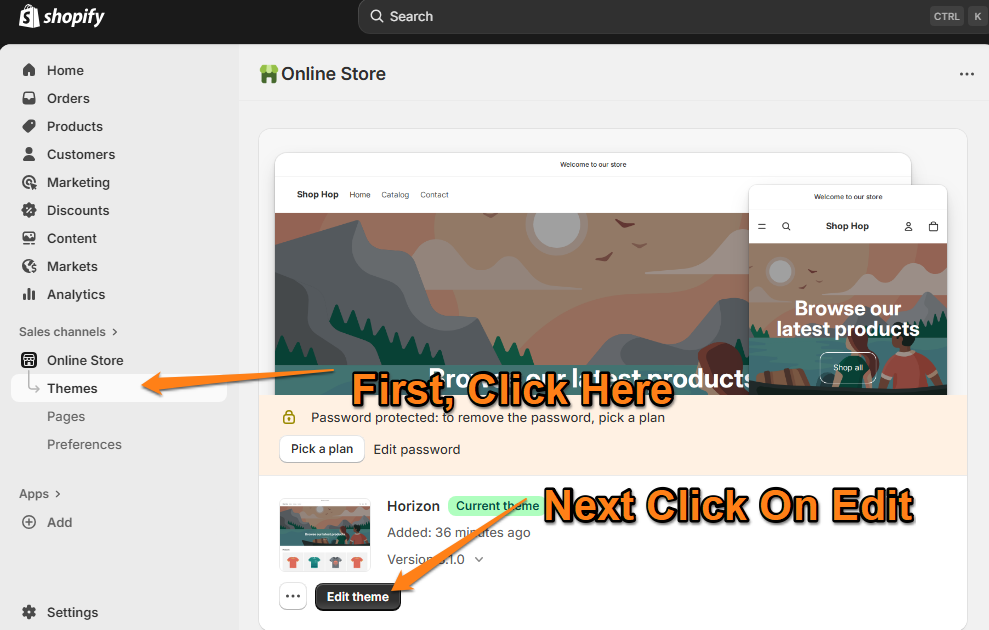
https://admin.shopify.com/store/
Once you’re on the Admin page:
- Click Online Store
- Then choose Themes
- And tap on Edit Theme
This gives you access to all AI-assisted design and content options.
Second, Know How to Summon Shopify’s AI Sidekick Tool
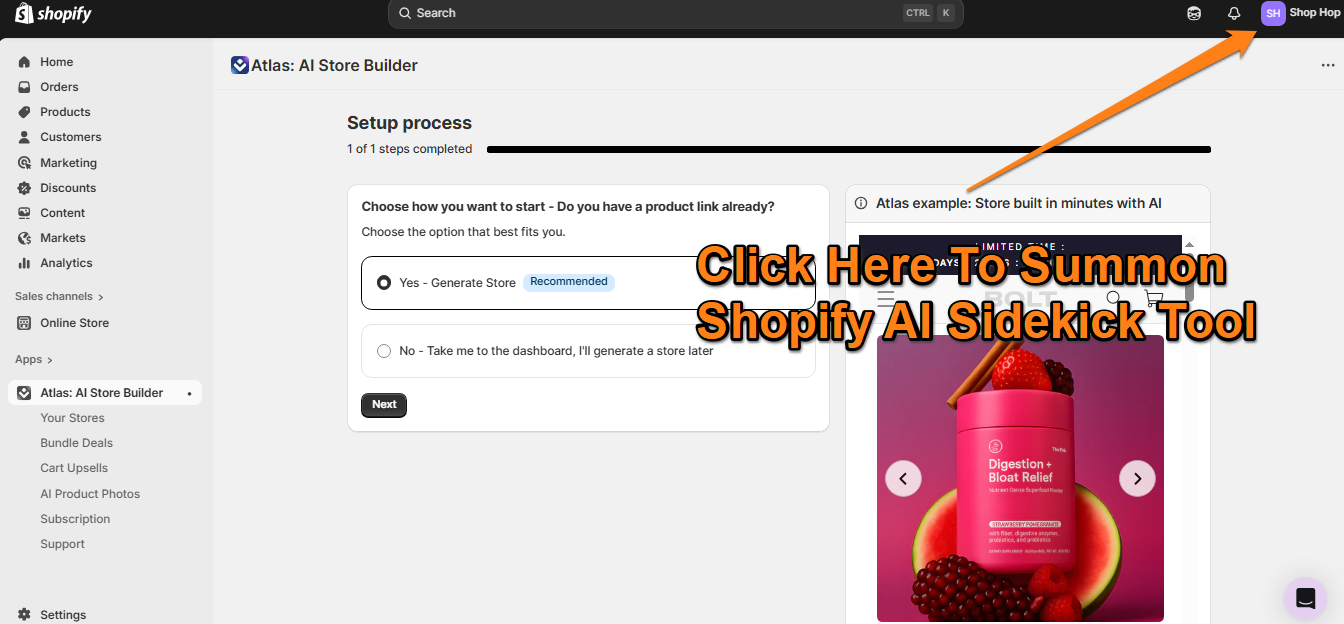
Before we go deeper, you need to know how to activate Shopify’s AI tool.
Accessing it is incredibly simple; just click the Sidekick icon in the top-right corner.
You’ll be using Shopify AI many times as you set up your store, so this becomes a core part of your workflow.
Create Your Shopify Store Theme Using AI
If you’re working with a new store, you’ll see a “Design Your Store” option on your Shopify homepage.
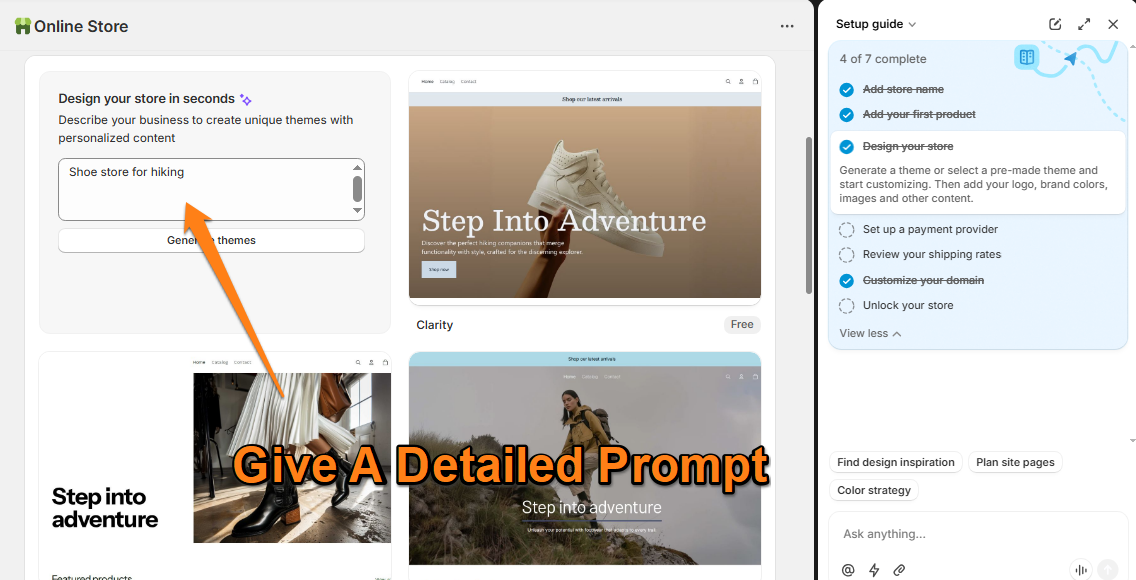
Here, you can enter simple or detailed prompts like:
- “Shoe Store”
- “Shoe Store for Women”
- “Shoe Store for Outdoor Adventures/Adventurer”
Once you submit the prompt, the Shopify Magic AI tool will automatically generate a theme for you. Preview it using the demo option before applying it storewide.
After applying it, you can still edit your Shopify website or theme the same way you would customize any other Shopify theme. It’s a great start unless you need a custom-made Shopify theme for your store.
Create Product Listings Using Shopify AI Tools
Shopify Magic’s Sidekick assistant stays available across your entire dashboard.
Open the product where you want to generate a description → click the Sidekick AI icon → and prompt the AI to create an SEO-optimized product listing.
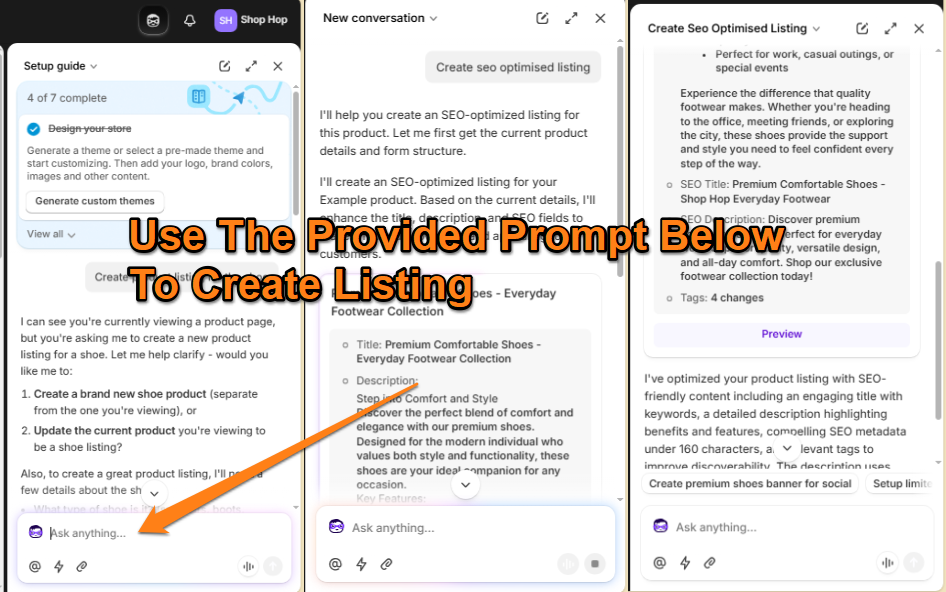
For best results, provide a detailed brief. Below is the ecommerce prompt our Shopify SEO Optimisation service team recommends for high-quality product listing generation:
PRODUCT LISTING DEVELOPMENT TEMPLATE
Create a product listing using the following product attributes.
(Fill this out and paste into Shopify Magic)
Product Name:
(Example: “Handwoven Macrame Wall Hanging”)
Product Type / Category:
(Example: Home décor → Wall Art → Macrame)
Key Features / Materials:
(Example: 100% cotton rope, natural wood dowel, handmade)
Dimensions / Sizes:
(Example: 16″ W x 30″ H, Shoe Size 7)
What Makes It Special / Unique Selling Points:
(Example: ethically handcrafted, neutral aesthetic, premium materials)
Target Audience / Ideal Use:
(Example: apartment décor, boho homes, housewarming gifts)
Keywords You Want Included:
(If you don’t have any, just mention it.)
Additional Notes:
(Example: care instructions, color variations, FDA guidelines etc.)
Fill out this template with your product details, and Shopify’s AI tool will generate a high-quality SEO-friendly listing.
Transform Product Images
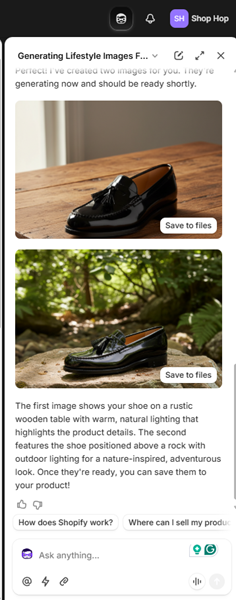
The Shopify AI tool can also enhance and transform your product images.
You can generate lifestyle shots, contextual images, or ambience-based visuals—great for lifting conversions and adding variety to a small photo set.
Example prompt for a shoe store:
“Create an image of this shoe on a wooden table and another image placed on a rock outdoors.”
Shopify AI will create images within minutes.
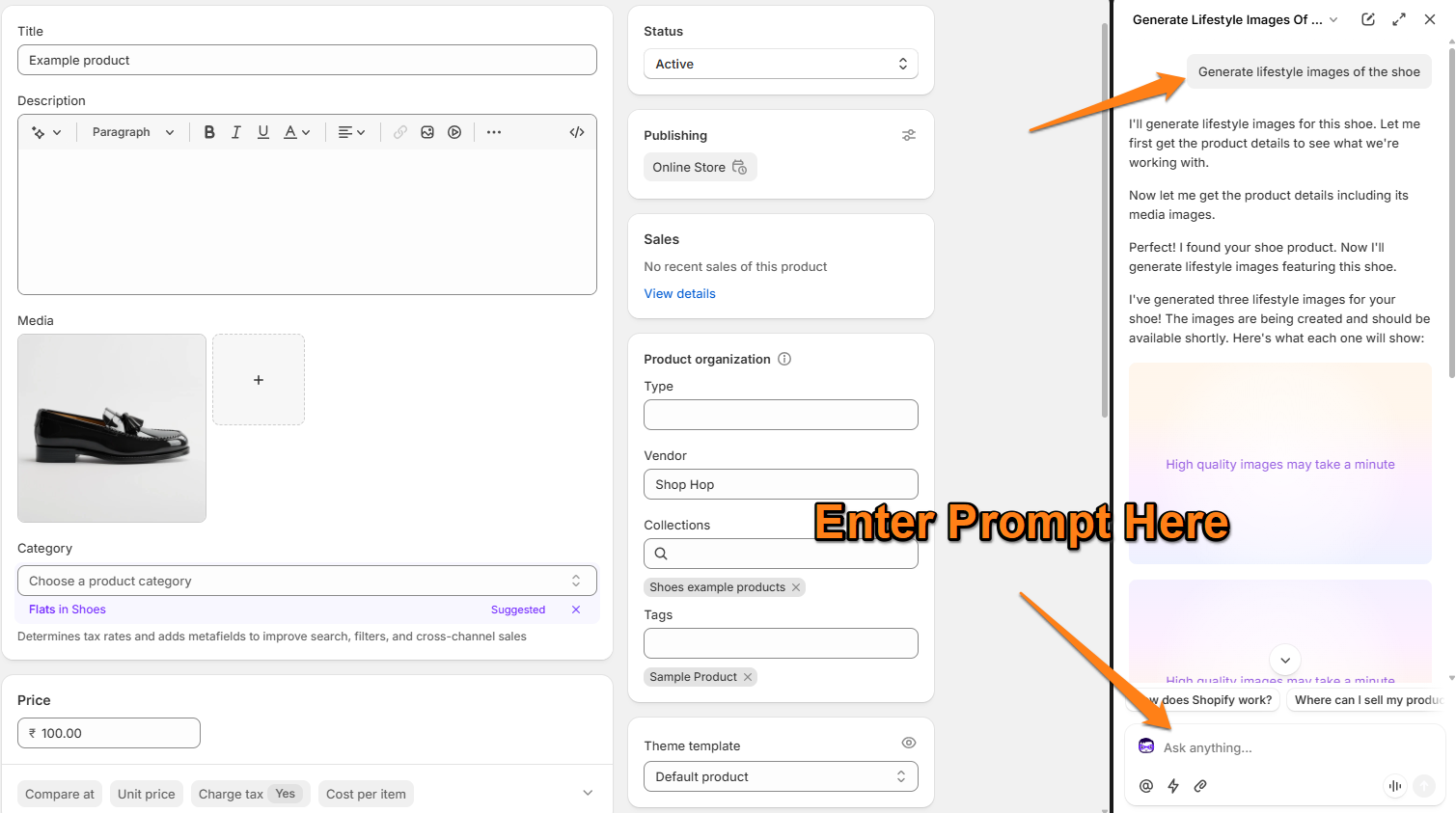
Our expert Shopify SEO services team still recommends replacing AI-generated images with polished, professional photos long-term, but using AI early helps you get a fast, high-quality starting point.
Create Email Campaigns Using Shopify AI Tools
The “Shopify AI tool” can also help you quickly generate high-quality email campaigns and automations for your store.
You can create welcome emails, abandoned-cart reminders, product announcements, or seasonal promotions, perfect for boosting conversions and engaging customers without spending hours writing copy.
Example prompt for a shoe store:
“Write a welcome email for a women’s hiking shoe store. Keep it friendly, highlight comfort and durability, and add a 10% first-order discount.”
Shopify AI will generate the full email in seconds, including subject line options and a clear call-to-action.
I still recommend refining the tone and brand voice manually for long-term email performance—but using AI initially helps you get a strong, conversion-ready first draft with very little effort.
Personalize Marketing Campaigns and CX
Personalisation used to mean digging through data and manually figuring out who your VIPs, lapsed customers, or big spenders were. Now, Shopify Sidekick AI does it for you.
Simply ask: “Who are my top customers in the last 3 months?” or “Which customers haven’t purchased in a year?” and Sidekick will instantly create segments you can target.
Once you have those segments, Shopify Magic can draft personalised campaigns. For example, you can generate a VIP-only email with one prompt and a re-engagement email for dormant customers with another. You can even ask Sidekick which promotions work best for one-time buyers and let Magic write the copy.
Sidekick can also help personalise on-site shopping experiences. It analyses purchase behaviour and suggests “customers who bought X also liked Y” recommendations—often spotting patterns you’d normally miss.
With Shopify Magic and Sidekick, even small stores can run targeted, personalised campaigns that feel handcrafted and drive higher engagement and conversions.
Custom Theme Blocks
For quick customisation, Shopify AI tools also let you create custom theme blocks using Sidekick.
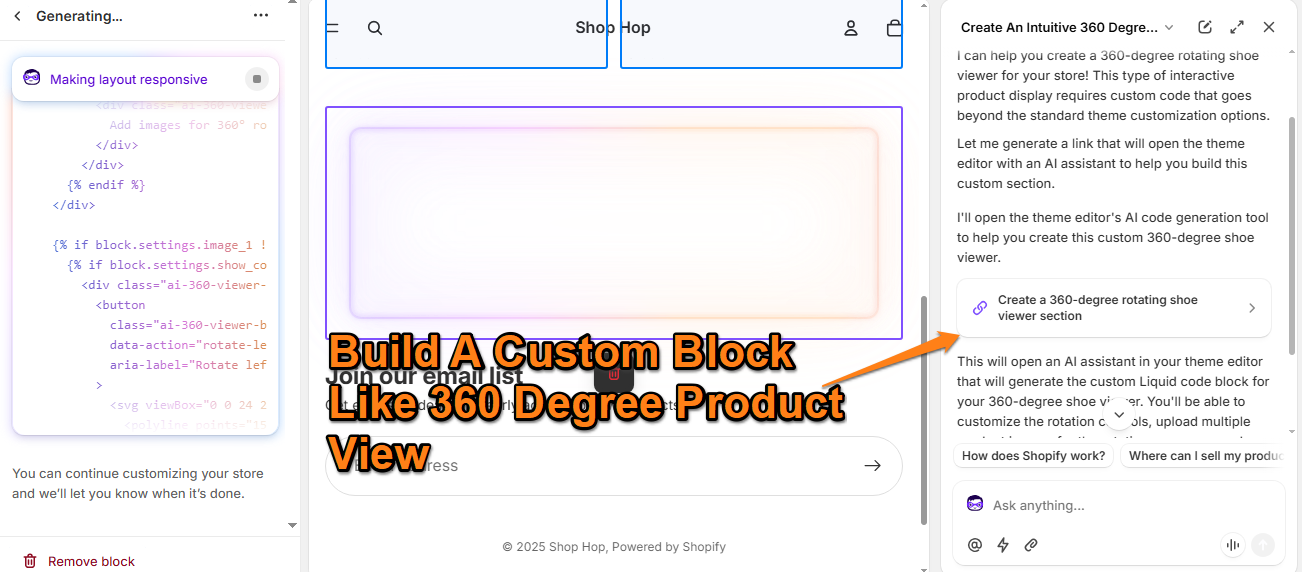
You can build features like:
- A 360° product view
- Custom product page elements
- Interactive sections
- Additional layout blocks
Shopify will generate the required code for your custom block—ready to use instantly. You can continue prompting Sidekick to refine or expand these blocks.
Final Verdict on Shopify Magic AI Tool
Shopify Magic Sidekick is more than enough when you’re looking for the best approach to “How to Set Up a Shopify Store Using AI Tools for free”.
However, like any tool, AI isn’t perfect.
That’s why our conversion rate optimization service team recommends using AI to accelerate your workflow while still following solid development, design, and SEO best practices.
What Are the Top AI Tools for Shopify in 2026?
Besides Shopify Magic, there are several powerful top AI tools for Shopify stores in 2026 that can speed up development, content creation, CRO, support, and operations. Here are the ones I’d actually recommend using while learning How To Set Up a Shopify Store Using AI Tools in a practical, real-world way.
Veo 3 – AI Product Video Generator
Veo 3 creates quick, polished product videos for ads, PDPs, and social media. If you don’t have a video team or studio setup, Veo gives you scroll-stopping videos in minutes.
https://x.com/Mike_Scully_/status/1970790402279244112?s=20
Claude – Ideal for Developers & App Builders
Claude is great for developers who want to prototype or build custom Shopify apps and automations.
Just note: AI can write the first version, but you still need to debug and maintain the code—vibe coding gets you in the door, but not across the finish line.
ChatGPT – Product Descriptions, Email Copy & Light Coding
ChatGPT remains one of the most versatile tools. You can use it for:
- Writing better product descriptions
- Building email flows
- Improving UI text and landing page copy
- Generating small Liquid snippets for theme tweaks
Think of it as your daily support assistant.
BuildYourStore – AI Store & Theme Generator
BuildYourStore works similarly to Shopify Magic Sidekick AI, but with more ready-made templates and store presets.
What to know:
- It’s paid, not free
- Great for a quick first version of your theme
- You may still need a developer for polishing and CRO
It offers:
- AI-powered store creation
- Auto-generated branding + content
- Automated SEO
- Templates + analytics
- Dropshipping-focused features
- Seamless Shopify integration
The only drawback: AI-generated stores can feel generic unless you customise them properly.
Atlas Store Builder – Fast AI Store Builder With CRO Features
Atlas is similar to BuildYourStore but with a conversion-first approach.
It can build a full store in minutes, complete with:
- Bundle offers
- Cart upsells
- AI product photos
- Pre-written landing page copy
Useful when you need a working store structure quickly and want AI to handle the repetitive setup tasks.
Tidio – AI Customer Support & Chatbots
If you’re adding AI-powered customer support, Tidio is one of the best options — and a good fit for your AI chatbot development services.
Tidio helps with:
- AI-driven live chat
- Automated responses
- Order tracking
- Product recommendations
- 24/7 AI agent (Lyro)
- Smart suggestions to improve CSAT
- Lead capture & upsell flows even when you’re offline
Great for stores that want faster support without hiring extra agents.
Prediko – AI Forecasting & Inventory Automation
Prediko helps Shopify stores avoid over-stocking and stockouts — especially useful for DTC brands with multiple SKUs.
It offers:
- Real-time inventory syncing
- Demand forecasting
- Automated purchase orders
- Clear restock suggestions
Prediko becomes far stronger when connected to your backend stack. Many brands pair it with their ERP integration for Shopify or CRM workflows — something we help implement when merchants want cleaner operations and automated stock visibility.
Here is the rewritten section, broken into clear H3/H4 subsections, matching your writing style — short, sharp, and practical.
It flows naturally with the rest of your blog.
How Does Shopify Magic Compare to Other AI Tools?
Shopify Magic performs extremely well for most Shopify setups, but different AI tools shine in different places. Here’s a breakdown of how Shopify Magic compares across privacy, use cases, access, and limitations — so you know exactly where it wins and where a third-party AI tool might make more sense.
Privacy, Trust & Data Control
Because Shopify Magic is a first-party AI, it has a major advantage:
- It already runs inside your Shopify ecosystem
- It follows Shopify’s own privacy rules
- It doesn’t require extra permissions
- You don’t have to worry about where your store data goes
Third-party AI tools (ChatGPT, Claude, Atlas, BuildYourStore, Tidio, etc.) require you to trust how they handle your product data, customer behavior, and store information. Many of them are reliable — but they’re still external platforms.
Winner for privacy:
Shopify Magic
Use Case: Store Setup & Daily Workflow
Shopify Magic is unbeatable when it comes to store setup tasks because it works natively inside your dashboard.
It does extremely well with:
- Theme generation
- On-page edits
- Product listing creation
- Email drafts
- Admin tasks
- Personalisation blocks
- Custom theme blocks with generated code
If your goal is to set up a store quickly, Shopify Magic is usually the simplest and fastest option.
But for certain tasks, third-party tools outperform it:
- Veo 3 → far better for video creation
- ChatGPT → better for long-form descriptions, SEO, or advanced prompts
- Claude → stronger for app development or coding-heavy tasks
Winner for store setup:
Shopify Magic
Winner for deep creativity or long-form content:
ChatGPT / Claude / Veo 3
Availability & Cost
A big advantage of Shopify Magic is that it’s:
- Free for all Shopify users
- Built-in (no installation required)
- Always updated to match Shopify’s latest features
In comparison:
- BuildYourStore AI → paid
- Atlas Store Builder → paid
- ChatGPT → requires Plus or Team for best results
- Claude → developer-friendly plans
- Veo 3 → requires credits or access through specific platforms
This makes Shopify Magic the most accessible AI for beginners and small teams.
Winner for availability:
Shopify Magic
Accuracy & Context Awareness
Shopify Magic has access to your:
- Products
- Collections
- Themes
- Policies
- Store structure
- Admin data
So the output is more context-aware and often more accurate for:
- Store edits
- Product details
- Theme-related tasks
- Shop policies
- Shipping or tax explanations
Third-party AIs are more powerful in pure creativity but require you to paste context manually.
Winner for store-aware tasks:
Shopify Magic
Winner for high-creativity tasks:
ChatGPT / Claude
Where Third-Party Top Shopify AI Tools Are Better
Despite its strengths, Shopify Magic isn’t the best tool for everything.
Here’s where external tools win:
- Veo 3 → Best for video creation
- ChatGPT (with custom GPTs) → Best for SEO, long descriptions, blog content, CRO copy
- Claude → Best for app development or debugging
- Tidio → Best for AI customer support
- Prediko → Best for demand forecasting and inventory AI
Magic gives you a good first draft; these tools help you level up.
Which Top AI for Shopify Should You Use?
If your goal is to build a store quickly, edit your theme, generate product listings, personalise your storefront, automate basic emails, and stay fully within the Shopify ecosystem, then Shopify Magic is more than enough. It handles the core setup work exceptionally well.
But if you need more advanced outputs, like high-quality video content, deeper SEO structure, long-form email flows, custom coding, or richer product storytelling—then pairing Shopify Magic with tools like ChatGPT, Claude, or Veo 3 is the smarter approach.
In reality, the sweet spot is using Shopify Magic for all your setup and admin tasks, and bringing in third-party top Shopify AI tools when you need extra creativity, depth, or specialised functionality that goes beyond what Shopify’s native AI can produce.
Final Thoughts
AI has completely changed how modern Shopify stores are built, launched, and scaled. By now, you’ve seen How To Set Up a Shopify Store Using AI Tools, explored What Are the Top AI Tools for Shopify in 2026, and understood How Does Shopify Magic Compare to Other AI Tools? The reality is simple, Shopify Magic gives you the fastest, most integrated way to handle the core setup, while third-party AI tools help you go deeper with creativity, automation, and optimisation. When you use both together, you get the best of speed, accuracy, and innovation, giving your Shopify store everything it needs to grow in an AI-driven eCommerce world.
F.A.Qs
Q1. What is Shopify Magic, and is it basically just ChatGPT?
Not exactly. Shopify Magic is Shopify’s built-in AI system that works inside your admin dashboard. Yes, it uses large language models similar to ChatGPT, but it’s not just a chatbot. It understands your actual products, store data, past orders, and brand tone, so the content it generates is much more relevant without needing long prompts.
Q2. Is Shopify Magic free to use?
Yes — Shopify Magic is free for all Shopify merchants, no matter which plan you’re on. You get AI-written product descriptions, email subject lines, instant content suggestions, and access to the Sidekick assistant. Some experimental features may roll out gradually depending on your region.
Q3. Can AI build my entire Shopify store from scratch?
For the most part, yes. Shopify’s AI store builder and tools like BuildYourStore or Storebuild.ai can generate a working storefront from a simple prompt. You describe your brand, and the AI builds the layout, writes the first draft of your copy, and even generates images. You’ll still want to refine the final version, but it gives you a huge head start when learning How To Set Up a Shopify Store Using AI Tools.
Q4. Will AI-generated content hurt my SEO?
Not if you use it the right way. Google focuses on helpful, original content — not whether AI wrote it. The risk comes when you paste AI output without editing. As long as you add your own angle, unique details, and a natural brand voice, AI-assisted content performs perfectly well in search.
Q5. How is Shopify Sidekick different from a normal customer support bot?
Sidekick isn’t for your shoppers — it’s for you. It’s more like an AI assistant built into your admin panel. You can ask it to create discounts, rewrite product descriptions, summarize sales, or help edit your theme. Tools like Tidio or Shopify Inbox are customer-facing; Sidekick is merchant-facing.
Q6. What are the best AI tools for dropshipping on Shopify in 2026?
Top picks include AutoDS for automated product sourcing and fulfillment, Dropmagic for creating conversion-ready stores from product URLs, and Jungle Scout for AI-powered product research. These tools focus on the operational side of dropshipping and pair well with What Are the Top AI Tools for Shopify in 2026 mentioned earlier in this guide.
Q7. How can AI improve my product photography?
You don’t need a full studio anymore. Shopify’s Magic media tools let you clean up backgrounds or place your product in realistic AI-generated settings — like lifestyle scenes or flat-lay environments. Apps like Flair.ai take this further by creating branded visuals from just one or two raw photos.
Q8. Is there an AI tool that can handle customer service 24/7?
Yes. Platforms like Tidio or Shopify Inbox (powered by Magic) can answer questions instantly, day or night. They understand natural language, handle common queries, help with order updates, and even nudge hesitant shoppers with proactive messages. Expect these AI agents to get even smarter over the next year.
Q9. Can AI really replace a human copywriter?
AI is excellent for repetitive tasks — like writing hundreds of product descriptions or quick email drafts — but humans still win when it comes to emotional brand messaging, storytelling, and strategic copy. The best approach is a mix: AI for speed and scale, humans for polish and personality.
Q10. How do I automate workflows outside Shopify’s built-in AI?
Tools like Zapier and n8n let you connect Shopify to apps like Slack, Google Sheets, Meta Ads, or your email platform. For example, you can trigger ChatGPT to write a social post every time a new product is added. These automations are great if you’re comparing How Does Shopify Magic Compare to Other AI Tools?, especially when you want to extend AI beyond the Shopify dashboard.
About the Author


Related Articles